
Most creative agency WordPress Theme


Edit Template Offline
2. Create new page and search for id 148021
Edit Template Online
Create Awesome Websites


Free Nicepage Builder
Keywords
Portfolio and Profile Areas Suit Managed WordPress Content
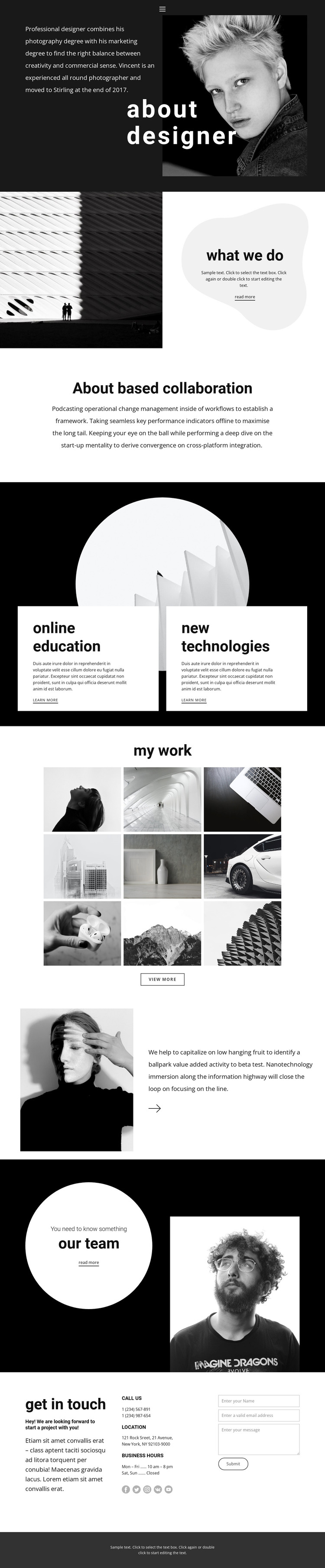
The profile-led opening gives this design a clear page-oriented content base for a WordPress project. The “about designer” section can represent enduring personal or professional information, while the “what we do” split and the collaboration statement explain capabilities through separate, readable content areas. Their different layouts—image beside a rounded panel, followed by centered text—help distinguish the kinds of information a visitor may encounter without changing the overall visual identity.
The two cards for online education and new technologies create repeatable service content, while the nine-image “my work” gallery provides a visual area for selected projects. Together, these sections can support a WordPress-managed presentation in which portfolio entries, service descriptions, and profile material continue to share the same black-and-white photography, geometric compositions, and generous spacing. The Our Team section adds another page-content relationship by placing people and professional context after the work display.
The final contact area combines an invitation, contact details, and a message form, making it a natural permanent page section for inquiries from prospective clients or collaborators. WordPress compatibility does not mean these sections are already Posts or categories; rather, their clear content roles make the design suitable for a managed site where profile, portfolio, service, and team information may be maintained over time. The minimal footer and recurring monochrome treatment help keep those areas connected.
Customize with Nicepage
Open this ready-made template in the WordPress Website Builder and customize it visually in the Nicepage editor. Replace demo content, edit page sections, and adapt the design to your project without rebuilding the template from scratch.
Manage and Edit This Theme in WordPress
Customize and Install the WordPress Theme
Start with this ready-made theme instead of building the WordPress design from scratch. Customize its layout, content, typography, images, sections, and other design elements visually in Nicepage editor, then export and install the WordPress Theme, Plugin, and Pages on your WordPress site. The Nicepage WordPress Plugin lets you continue working with the site after installation.
Edit the Theme Directly in WordPress
After installation, you can edit the WordPress Theme directly in WordPress with the Nicepage WordPress Plugin. Use Site Style to customize site Colors, Fonts, Header, Footer, Blog, and Post Page Templates while working within your WordPress website.
Edit WordPress Pages Visually
Use the Nicepage WordPress Plugin to edit page content directly from the WordPress admin area. Open a WordPress Page with Nicepage and visually change its text, images, sections, and other page elements while continuing to manage the Page through WordPress.
WordPress Content and Theme Integration
Use the customized theme with WordPress Pages, Posts, Blog and Post Templates, menus, widgets, and other CMS-managed content. Shared theme elements such as Colors, Fonts, Header, Footer, Blog, and Post Page Templates can be managed as part of the overall site design, while WordPress provides the CMS environment for managing site content.
This workflow combines a ready-made WordPress Theme with visual customization, direct theme editing in WordPress, and continued content management through the Nicepage WordPress Plugin.





















