
High-class business WordPress Theme


Edit Template Offline
2. Create new page and search for id 2076159
Edit Template Online
Create Awesome Websites


Free Nicepage Builder
Keywords
Page Content Moves from Consulting to Company Information
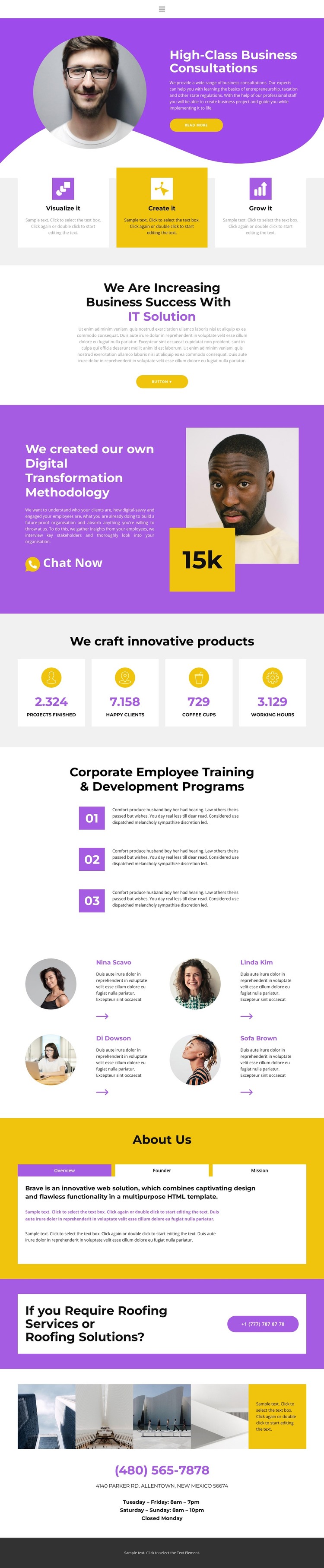
The consultation hero and its read more action establish the primary page message, while the three Visualize it, Create it, and Grow it cards divide the introductory capabilities into repeated content units. The centered IT solution section and the split digital transformation methodology block can then carry more detailed page-oriented explanations. Their different layouts—one focused on centered copy and a button, the other combining text, chat action, portrait, and a highlighted badge—help separate related business content within the same visual system.
Further down, the four metric cards provide a compact area for structural achievement content, and the three numbered employee training items organize development programs as a readable sequence. Four testimonial profiles add a people-focused section with circular portraits and quotations. The About Us area gives permanent company information a separate arrangement through Overview, Founder, and Mission tabs, while the roofing services callout creates a focused service prompt that can remain distinct from the consulting content.
The final image strip, phone details, address, opening hours, and dark footer complete the page's practical information. In a WordPress-oriented project, these page areas provide a clear basis for maintaining permanent business content alongside other site material, without claiming that blog posts or other CMS structures already exist. The purple, yellow, white, and light-gray palette keeps those different content roles connected as the site develops.
Customize with Nicepage
Open this ready-made template in the WordPress Website Builder and customize it visually in the Nicepage editor. Replace demo content, edit page sections, and adapt the design to your project without rebuilding the template from scratch.
Manage and Edit This Theme in WordPress
Customize and Install the WordPress Theme
Start with this ready-made theme instead of building the WordPress design from scratch. Customize its layout, content, typography, images, sections, and other design elements visually in Nicepage editor, then export and install the WordPress Theme, Plugin, and Pages on your WordPress site. The Nicepage WordPress Plugin lets you continue working with the site after installation.
Edit the Theme Directly in WordPress
After installation, you can edit the WordPress Theme directly in WordPress with the Nicepage WordPress Plugin. Use Site Style to customize site Colors, Fonts, Header, Footer, Blog, and Post Page Templates while working within your WordPress website.
Edit WordPress Pages Visually
Use the Nicepage WordPress Plugin to edit page content directly from the WordPress admin area. Open a WordPress Page with Nicepage and visually change its text, images, sections, and other page elements while continuing to manage the Page through WordPress.
WordPress Content and Theme Integration
Use the customized theme with WordPress Pages, Posts, Blog and Post Templates, menus, widgets, and other CMS-managed content. Shared theme elements such as Colors, Fonts, Header, Footer, Blog, and Post Page Templates can be managed as part of the overall site design, while WordPress provides the CMS environment for managing site content.
This workflow combines a ready-made WordPress Theme with visual customization, direct theme editing in WordPress, and continued content management through the Nicepage WordPress Plugin.





















