
Central digital agency WordPress Theme


Edit Template Offline
2. Create new page and search for id 19418
Edit Template Online
Create Awesome Websites


Free Nicepage Builder
Keywords
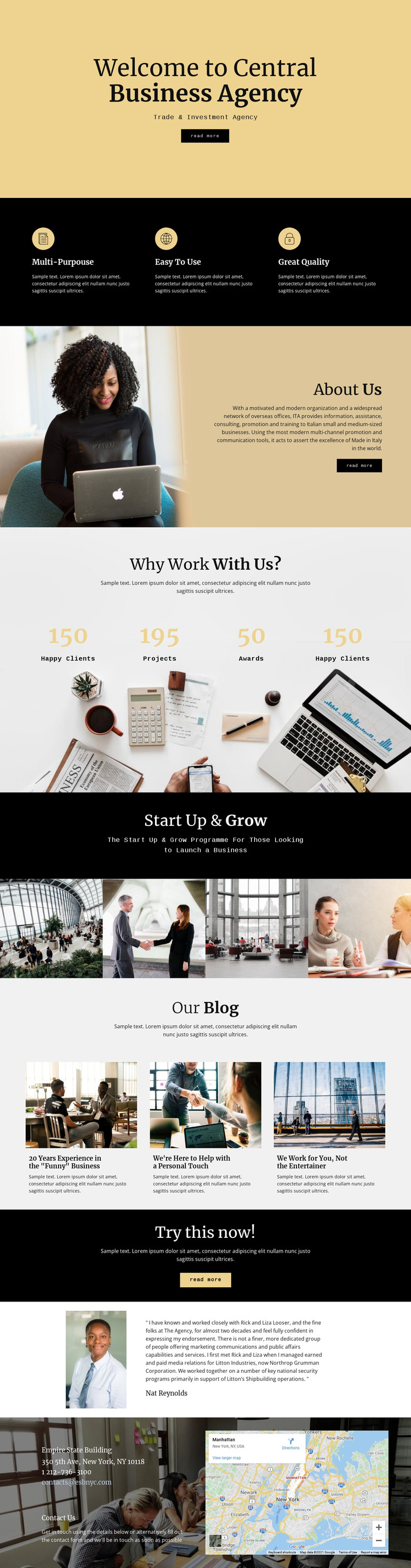
Blog Entries and Agency Pages Share One Visual Direction
The three entries under Our Blog give this design a clear content area for regularly updated or editorial material, while the opening and About Us sections provide more permanent agency information. That distinction is useful in a WordPress-oriented project: page-style content can explain Central Business Agency and its Trade & Investment Agency role, while article-style content can develop the insights suggested by the existing blog row. The template analysis confirms the entries as structural content, but not the demo titles as verified business facts.
The Start Up & Grow programme offers a second relationship between content and presentation. Its dedicated heading, subtitle, and four-image strip can serve as a focused page area for business-support information, separate from the blog’s article rhythm. The Why Work With Us? section adds displayed metrics and supporting imagery, while the testimonial introduces a portrait-and-quote format that can remain visually distinct from recurring article cards.
Navigation and shared site elements are not expanded beyond what the analysis verifies, so the template should not be described as already containing WordPress Posts, categories, or a complete multi-page theme structure. Instead, its value lies in the way permanent agency information, programme content, editorial entries, endorsement, and contact details already occupy recognizable visual regions. Those regions can be mapped to WordPress-managed content while preserving the design’s cream, black, gray, gold, serif, and monospaced visual character.
Customize with Nicepage
Open this ready-made template in the WordPress Website Builder and customize it visually in the Nicepage editor. Replace demo content, edit page sections, and adapt the design to your project without rebuilding the template from scratch.
Manage and Edit This Theme in WordPress
Customize and Install the WordPress Theme
Start with this ready-made theme instead of building the WordPress design from scratch. Customize its layout, content, typography, images, sections, and other design elements visually in Nicepage editor, then export and install the WordPress Theme, Plugin, and Pages on your WordPress site. The Nicepage WordPress Plugin lets you continue working with the site after installation.
Edit the Theme Directly in WordPress
After installation, you can edit the WordPress Theme directly in WordPress with the Nicepage WordPress Plugin. Use Site Style to customize site Colors, Fonts, Header, Footer, Blog, and Post Page Templates while working within your WordPress website.
Edit WordPress Pages Visually
Use the Nicepage WordPress Plugin to edit page content directly from the WordPress admin area. Open a WordPress Page with Nicepage and visually change its text, images, sections, and other page elements while continuing to manage the Page through WordPress.
WordPress Content and Theme Integration
Use the customized theme with WordPress Pages, Posts, Blog and Post Templates, menus, widgets, and other CMS-managed content. Shared theme elements such as Colors, Fonts, Header, Footer, Blog, and Post Page Templates can be managed as part of the overall site design, while WordPress provides the CMS environment for managing site content.
This workflow combines a ready-made WordPress Theme with visual customization, direct theme editing in WordPress, and continued content management through the Nicepage WordPress Plugin.





















