Jungle travel WordPress Theme


The Travel Story Heading Works as Stable WordPress Page Content
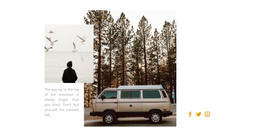
The block’s written content has the character of a stable page section: the “travel story” label introduces the subject, and “New step for the best travel” provides the main statement. The right-side forest scene with a small cabin reinforces that theme visually without adding a second editorial stream. In a WordPress-managed page, this combination can remain a consistent introductory region while the wider project develops related travel content around it.
The content and presentation are closely connected. Left-aligned black typography makes the heading the first reading point, and the muted beige accent on “best travel” identifies the phrase that receives additional visual weight. The tall image then balances the text column and supplies a clear nature-oriented setting. White space between and around these areas keeps the section open, while crisp rectangular edges prevent the design from becoming overly decorative. Its static interaction means the block communicates through this stable arrangement rather than changing content.
This section could sit on a WordPress-managed travel or hospitality page before longer descriptions, destination entries, galleries, or inquiry content. The surrounding site may manage those other content areas separately, but the block itself retains one focused role: presenting a short travel introduction through a heading-and-image pairing. That makes it suitable for permanent page content while preserving a consistent visual pattern within the larger theme.
Customize with Nicepage
Open this ready-made template in the WordPress Website Builder and customize it visually in the Nicepage editor. Replace demo content, edit page sections, and adapt the design to your project without rebuilding the template from scratch.
Edit Template Offline
2. Create a new page or select existing
3. Click Add new block, search for id 149884 and click enter
Edit Template Online
Create Awesome Websites


Free Nicepage Builder
Keywords
Use This Block in a WordPress-Managed Website
Keep the Block as Page Content
Use the block as one content/layout section inside a WordPress-oriented site rather than treating the Block ID as a complete WordPress Theme. Its verified text, images, repeated items, forms, galleries, or other elements can remain part of permanent page content while WordPress manages the wider site.
Work With Nicepage and WordPress
A Nicepage WordPress project can be installed using the WordPress Theme, Plugin, and Pages workflow. After installation, the same visual section can participate in WordPress-managed pages as part of the broader theme/site structure.
Continue Editing in WordPress
Nicepage supports editing the WordPress Theme directly in WordPress. Use WordPress Pages, Posts, Blog structures, and other CMS concepts only when they are relevant to the surrounding project; their existence must not be inferred from the analyzed block alone.
This workflow keeps the block's verified section function separate from the WordPress theme architecture while allowing it to participate in a CMS-managed website.