Reviews for this product WordPress Theme


The Personal Quote Works as Focused WordPress Page Content
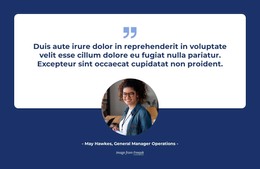
The block's strongest content relationship is between the displayed quote and its attributed person. Brigitte Nicole's name sits with the testimonial text, while the portrait to the right gives the statement a distinct human reference. The READ MORE button adds a possible next step beneath the attribution, but the section remains centered on the review itself rather than becoming a complete response flow.
The two-column composition makes the block suitable for stable page content in a WordPress-managed project. The left column concentrates the centered quote, attribution, and rounded outline action into one readable group. The right column holds a tall portrait with generous surrounding space, creating visual balance without adding a second testimonial or a dense card collection. The white background and restrained black-and-gray palette support a quiet editorial tone that can sit between more visually active page sections.
Within a broader WordPress site, this block can occupy a services, travel, or hospitality page as one reusable testimonial area. Other content can provide the page introduction, destination information, additional proof, or contact details, while this section preserves one personal review presentation. Its static structure also keeps the content relationship clear when the page is edited as a publishable content area rather than as a standalone theme.
Customize with Nicepage
Open this ready-made template in the WordPress Website Builder and customize it visually in the Nicepage editor. Replace demo content, edit page sections, and adapt the design to your project without rebuilding the template from scratch.
Edit Template Offline
2. Create a new page or select existing
3. Click Add new block, search for id 139883 and click enter
Edit Template Online
Create Awesome Websites


Free Nicepage Builder
Keywords
Manage and Edit This Theme in WordPress
Customize and Install the WordPress Theme
Start with this ready-made theme instead of building the WordPress design from scratch. Customize its layout, content, typography, images, sections, and other design elements visually in Nicepage editor, then export and install the WordPress Theme, Plugin, and Pages on your WordPress site. The Nicepage WordPress Plugin lets you continue working with the site after installation.
Edit the Theme Directly in WordPress
After installation, you can edit the WordPress Theme directly in WordPress with the Nicepage WordPress Plugin. Use Site Style to customize site Colors, Fonts, Header, Footer, Blog, and Post Page Templates while working within your WordPress website.
Edit WordPress Pages Visually
Use the Nicepage WordPress Plugin to edit page content directly from the WordPress admin area. Open a WordPress Page with Nicepage and visually change its text, images, sections, and other page elements while continuing to manage the Page through WordPress.
WordPress Content and Theme Integration
Use the customized theme with WordPress Pages, Posts, Blog and Post Templates, menus, widgets, and other CMS-managed content. Shared theme elements such as Colors, Fonts, Header, Footer, Blog, and Post Page Templates can be managed as part of the overall site design, while WordPress provides the CMS environment for managing site content.
This workflow combines a ready-made WordPress Theme with visual customization, direct theme editing in WordPress, and continued content management through the Nicepage WordPress Plugin.