Strategic architecture WordPress Theme


Stable Page Content With a Structured Statistics Row
The heading and paragraph give this block the character of stable informational page content rather than a time-based update. They introduce an urban-planning position centered on parks, flexible streets, healthier cities, and pedestrian-oriented outdoor spaces. The rounded image beside the copy supports that subject visually, while the two-column arrangement keeps the explanation separate from the image instead of mixing both into one undifferentiated content field.
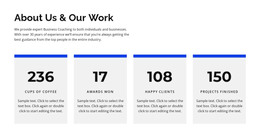
Four counters below extend the same section with a compact summary of project-related indicators. Their labels identify projects, offices, awards, and clients, and the displayed figures are 120, 45, 50, and 100. In a WordPress-managed page, this value-and-label structure can serve as a stable content area that editors revise when the underlying project information changes. The figures remain presentation content here; the surrounding page can supply any needed business context or substantiation.
The block therefore fits a permanent services, practice, or organization section within a broader WordPress page without becoming a theme by itself. Its visual sequence—position statement, supporting image, then concise indicators—helps readers understand the subject before scanning the summary figures. Other page content can surround this section, while the block retains a focused role for explanatory and profile-oriented information.
Customize with Nicepage
Open this ready-made template in the WordPress Website Builder and customize it visually in the Nicepage editor. Replace demo content, edit page sections, and adapt the design to your project without rebuilding the template from scratch.
Edit Template Offline
2. Create a new page or select existing
3. Click Add new block, search for id 1382074 and click enter
Edit Template Online
Create Awesome Websites


Free Nicepage Builder
Keywords
Manage and Edit This Theme in WordPress
Customize and Install the WordPress Theme
Start with this ready-made theme instead of building the WordPress design from scratch. Customize its layout, content, typography, images, sections, and other design elements visually in Nicepage editor, then export and install the WordPress Theme, Plugin, and Pages on your WordPress site. The Nicepage WordPress Plugin lets you continue working with the site after installation.
Edit the Theme Directly in WordPress
After installation, you can edit the WordPress Theme directly in WordPress with the Nicepage WordPress Plugin. Use Site Style to customize site Colors, Fonts, Header, Footer, Blog, and Post Page Templates while working within your WordPress website.
Edit WordPress Pages Visually
Use the Nicepage WordPress Plugin to edit page content directly from the WordPress admin area. Open a WordPress Page with Nicepage and visually change its text, images, sections, and other page elements while continuing to manage the Page through WordPress.
WordPress Content and Theme Integration
Use the customized theme with WordPress Pages, Posts, Blog and Post Templates, menus, widgets, and other CMS-managed content. Shared theme elements such as Colors, Fonts, Header, Footer, Blog, and Post Page Templates can be managed as part of the overall site design, while WordPress provides the CMS environment for managing site content.
This workflow combines a ready-made WordPress Theme with visual customization, direct theme editing in WordPress, and continued content management through the Nicepage WordPress Plugin.