
Business grow and strategy WordPress Theme


Edit Template Offline
2. Create new page and search for id 125947
Edit Template Online
Create Awesome Websites


Free Nicepage Builder
Keywords
The Gallery and Repeated Highlights Support Publishable Business Content
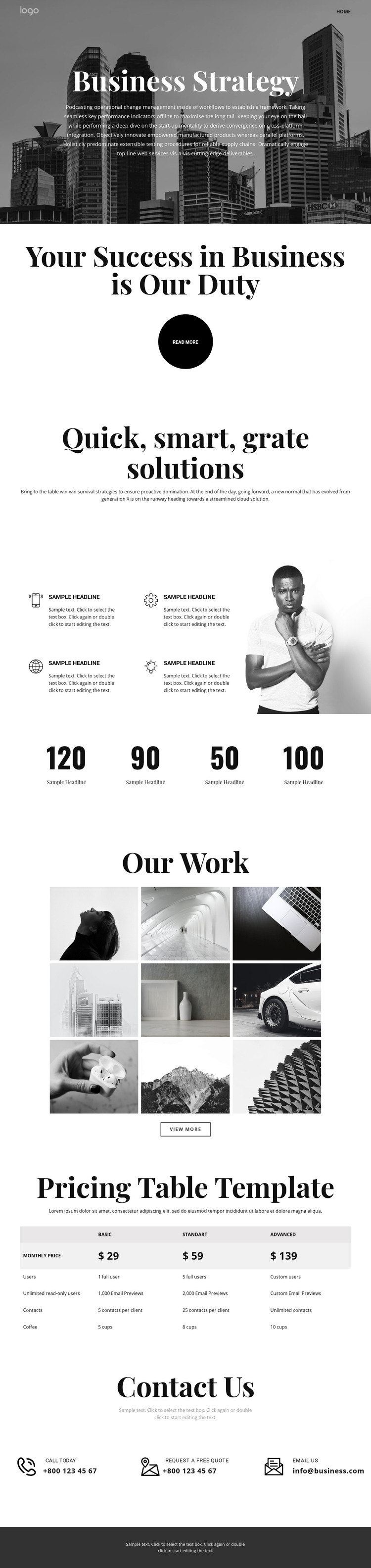
The repeated feature area gives this design a useful content pattern for a WordPress-managed business site. Four highlights sit beside an image, making the section suitable for concise service explanations or capability-focused content while keeping each item visually related to the others. The Business Strategy hero and the centered success statement provide the permanent page context, and the solutions introduction creates a natural lead-in before the repeated content begins.
The nine-image Our Work gallery can serve as a visual content region for projects or examples, while its View more action leaves room for a deeper presentation when the site requires additional detail. The four counters are also structurally useful as a separate information band, but their sample values should remain replaceable content rather than being presented as verified achievements. This separation helps distinguish visual proof from numerical claims.
The three pricing options provide a page-oriented comparison area, and the final Contact Us block gathers phone, free-quote, and email responses in one place. Those permanent sections could sit alongside regularly updated WordPress content without changing the template’s core character. The monochrome imagery, serif headings, centered layouts, shared navigation, and dark footer give both fixed page content and future published material a consistent visual setting. The result is a theme foundation shaped around business information, examples, plans, and inquiries rather than an empty visual shell.
Customize with Nicepage
Open this ready-made template in the WordPress Website Builder and customize it visually in the Nicepage editor. Replace demo content, edit page sections, and adapt the design to your project without rebuilding the template from scratch.
Manage and Edit This Theme in WordPress
Customize and Install the WordPress Theme
Start with this ready-made theme instead of building the WordPress design from scratch. Customize its layout, content, typography, images, sections, and other design elements visually in Nicepage editor, then export and install the WordPress Theme, Plugin, and Pages on your WordPress site. The Nicepage WordPress Plugin lets you continue working with the site after installation.
Edit the Theme Directly in WordPress
After installation, you can edit the WordPress Theme directly in WordPress with the Nicepage WordPress Plugin. Use Site Style to customize site Colors, Fonts, Header, Footer, Blog, and Post Page Templates while working within your WordPress website.
Edit WordPress Pages Visually
Use the Nicepage WordPress Plugin to edit page content directly from the WordPress admin area. Open a WordPress Page with Nicepage and visually change its text, images, sections, and other page elements while continuing to manage the Page through WordPress.
WordPress Content and Theme Integration
Use the customized theme with WordPress Pages, Posts, Blog and Post Templates, menus, widgets, and other CMS-managed content. Shared theme elements such as Colors, Fonts, Header, Footer, Blog, and Post Page Templates can be managed as part of the overall site design, while WordPress provides the CMS environment for managing site content.
This workflow combines a ready-made WordPress Theme with visual customization, direct theme editing in WordPress, and continued content management through the Nicepage WordPress Plugin.





















