
Studio of expressive art WordPress Theme


Edit Template Offline
2. Create new page and search for id 100899
Edit Template Online
Create Awesome Websites


Free Nicepage Builder
Keywords
Studio Pages, Visual Features, and Inquiries Share One Theme Direction
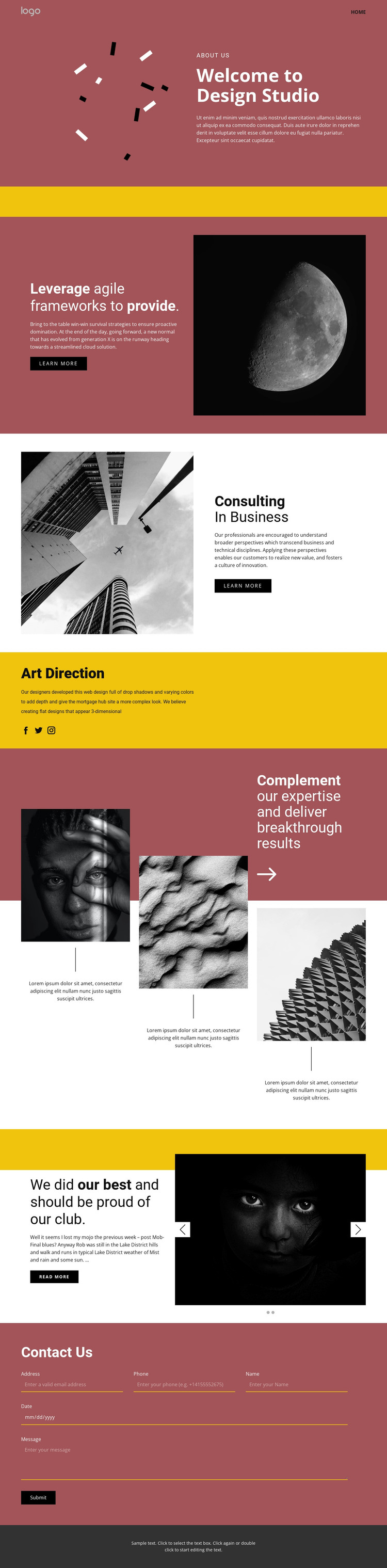
The permanent page content is clearly divided into areas that can be interpreted as WordPress-managed site content. About Us provides a studio overview, while Consulting In Business and Art Direction identify two named offerings that could anchor separate or expanded page content. The agile frameworks block adds a supporting proposition and learn-more action, giving the service presentation more than one level of detail.
The page also contains repeated visual material that can support ongoing content development. The three-image showcase uses captions to connect imagery with expertise, and the two-slide carousel creates a separate feature area for selected work or editorial material. Social links for Facebook, Twitter, and Instagram provide recognizable connection points, while the Contact Us form gives the theme a dedicated inquiry area. These relationships matter more than simply placing a CMS name beside the design: they show how studio information, service content, visual features, social destinations, and contact communication can remain within one visual system. The burgundy-and-yellow palette, editorial typography, and black-and-white image treatment can continue across related WordPress Pages or other managed content when the project expands. The verified analysis does not establish existing posts, categories, or blog structures, so the theme should be understood as a strong content-oriented starting design rather than proof of a completed WordPress site architecture.
Customize with Nicepage
Open this ready-made template in the WordPress Website Builder and customize it visually in the Nicepage editor. Replace demo content, edit page sections, and adapt the design to your project without rebuilding the template from scratch.
Manage and Edit This Theme in WordPress
Customize and Install the WordPress Theme
Start with this ready-made theme instead of building the WordPress design from scratch. Customize its layout, content, typography, images, sections, and other design elements visually in Nicepage editor, then export and install the WordPress Theme, Plugin, and Pages on your WordPress site. The Nicepage WordPress Plugin lets you continue working with the site after installation.
Edit the Theme Directly in WordPress
After installation, you can edit the WordPress Theme directly in WordPress with the Nicepage WordPress Plugin. Use Site Style to customize site Colors, Fonts, Header, Footer, Blog, and Post Page Templates while working within your WordPress website.
Edit WordPress Pages Visually
Use the Nicepage WordPress Plugin to edit page content directly from the WordPress admin area. Open a WordPress Page with Nicepage and visually change its text, images, sections, and other page elements while continuing to manage the Page through WordPress.
WordPress Content and Theme Integration
Use the customized theme with WordPress Pages, Posts, Blog and Post Templates, menus, widgets, and other CMS-managed content. Shared theme elements such as Colors, Fonts, Header, Footer, Blog, and Post Page Templates can be managed as part of the overall site design, while WordPress provides the CMS environment for managing site content.
This workflow combines a ready-made WordPress Theme with visual customization, direct theme editing in WordPress, and continued content management through the Nicepage WordPress Plugin.





















