Bespoke Textile Craft Template


Edit Template Offline
2. Create new page and search for id 6646162
Edit Template Online
Create Awesome Websites


Free Nicepage Builder
Keywords
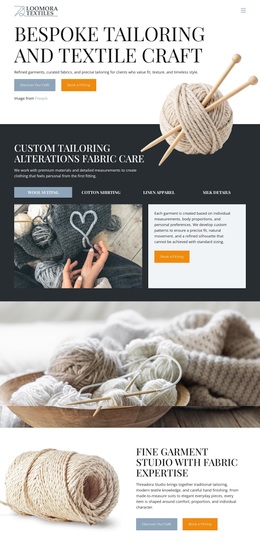
Fabric Detail and Process Coverage Make This a Distinctive Choice
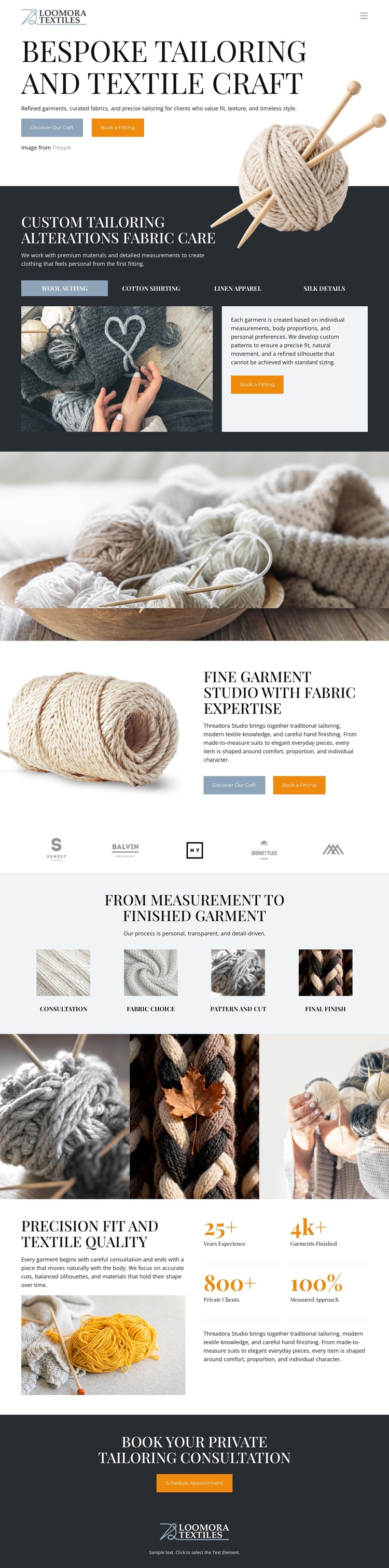
Large close-up photographs of yarn, fabric, braided textile, and hand-finishing make material itself the main carrier of the page’s message. That emphasis distinguishes this option from tailoring layouts built primarily around portraits, product listings, or dense service cards. The visual story is supported by concrete content: custom tailoring and artisanal fabric care introduce the offer, while the studio section connects garment expertise with the tactile quality of the materials.
The four-stage process adds useful coverage for visitors who want to understand how a finished garment develops. Measurement, fabric choice, pattern and fit, and final finish form a practical sequence that gives the design more than an attractive surface. The three-image craft gallery then returns to detail, allowing workmanship to remain visible between the explanatory sections. Together, the process and imagery create a balance between information and visual atmosphere.
The page also includes a quality-focused counter section with four proof points related to experience, garments, private clients, and measured precision. These values are structural proof elements rather than independently verified business claims, but their placement shows how the design supports reassurance after the process explanation. The final consultation panel provides a clear use case for a bespoke studio seeking private inquiries. As a ready-made design choice, its strength lies in combining tactile editorial presentation, process clarity, service coverage, and a focused consultation conclusion.
Customize with Nicepage
Open this ready-made template in the Template Builder and customize it visually in the Nicepage editor. Replace demo content, edit page sections, and adapt the design to your project without rebuilding the template from scratch.
Start With a Ready-Made Template
Choose a Design for a New Page
Use a ready-made template as a starting point instead of creating every page from a blank canvas. When adding a new page in Nicepage, browse available designs, compare different layouts, and choose an option that already fits the general purpose and visual direction of your project.
Browse Different Page Designs
Explore Page Designs using search, thematic categories, Design Sets, and full-page previews. The collection includes layouts for different subjects and page purposes, making it easier to compare alternatives before selecting a design to customize.
Customize the Selected Template
After choosing a design, create the page and continue editing it visually in Nicepage. Replace the demo content, adjust images, typography, colors, sections, and other elements, and adapt the ready-made layout to your own content instead of rebuilding the design from the beginning.
Explore More Design Directions
If the first option does not match your project closely enough, return to the design collection and compare other templates before committing to a layout. This makes the template library useful not only for faster page creation, but also for exploring different visual approaches and finding a suitable starting point for a new project.
This workflow gives you access to a broad collection of ready-made designs that can be selected, compared, and customized according to the needs of each new page or project.