Engage Your Audience Template


Edit Template Offline
2. Create new page and search for id 6393002
Edit Template Online
Create Awesome Websites


Free Nicepage Builder
Keywords
Twelve Brand Marks Connect Contact Content With Technology Imagery
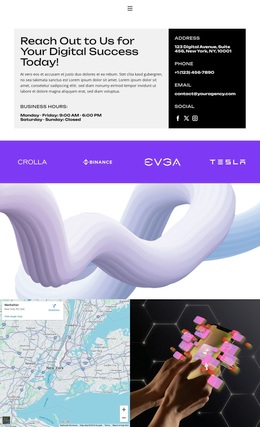
The design stands out through the way direct contact content is paired with repeated brand and technology visuals. At the top, the two-column contact panel gives the page an immediate practical purpose: introductory copy sits beside business hours, contact details, and social links. The strong black, white, gray, and vivid purple contrast makes that information feel like part of a recognizable visual direction rather than an isolated contact card.
The horizontal strip of 12 brand-logo tiles is the most distinctive supporting element. Its repeated rhythm introduces association and continuity beneath the opening panel, while the full-width abstract purple-and-white image supplies a deliberate visual pause. Lower on the page, a map is paired with a technology-themed image, extending the design from contact logistics into a broader digital-services presentation without adding unverified service claims.
The final “Let’s work together” area completes the practical coverage with explanatory copy and an email submission form. Together, the contact details, logo sequence, imagery, map, and inquiry control make this a useful design choice for a project that needs promotional energy without losing a clear contact function. The navigation also points to Home, About, Projects, FAQ, and Contact, so the page can fit a wider content context while remaining specifically centered on communication.
Customize with Nicepage
Open this ready-made template in the Template Builder and customize it visually in the Nicepage editor. Replace demo content, edit page sections, and adapt the design to your project without rebuilding the template from scratch.
Start With a Ready-Made Template
Choose a Design for a New Page
Use a ready-made template as a starting point instead of creating every page from a blank canvas. When adding a new page in Nicepage, browse available designs, compare different layouts, and choose an option that already fits the general purpose and visual direction of your project.
Browse Different Page Designs
Explore Page Designs using search, thematic categories, Design Sets, and full-page previews. The collection includes layouts for different subjects and page purposes, making it easier to compare alternatives before selecting a design to customize.
Customize the Selected Template
After choosing a design, create the page and continue editing it visually in Nicepage. Replace the demo content, adjust images, typography, colors, sections, and other elements, and adapt the ready-made layout to your own content instead of rebuilding the design from the beginning.
Explore More Design Directions
If the first option does not match your project closely enough, return to the design collection and compare other templates before committing to a layout. This makes the template library useful not only for faster page creation, but also for exploring different visual approaches and finding a suitable starting point for a new project.
This workflow gives you access to a broad collection of ready-made designs that can be selected, compared, and customized according to the needs of each new page or project.