Gallery with cake recipe Template


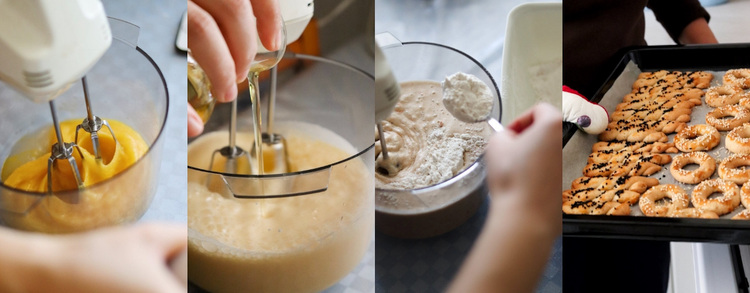
A Four-Panel Sequence Instead of a Conventional Image Grid
The strongest reason to choose this block is its specific combination of content sequence and compact geometry. Rather than presenting unrelated food photographs in a conventional grid, it places four stages beside one another: mixing eggs, mixing batter, adding flour, and displaying trays of baked cookies. That progression gives the gallery a beginning, middle, and result while keeping the section limited to one horizontal band.
The equal-width vertical panels make every stage visually comparable. Edge-to-edge crops give the photographs presence, and the narrow divisions provide just enough separation to keep the scenes distinct. Warm yellow, cream, and brown tones reinforce the shared baking subject without requiring labels inside the block. This makes the design useful when imagery needs to carry the story directly.
The interaction adds another reason to select this option. Hover fade overlays provide a clear response as visitors explore the panels, while the lightbox supports a closer look at the food-preparation details and finished cookies. The result is a ready-made gallery choice for a page that needs process-oriented visual evidence with more narrative direction than a simple row of decorative images.
Customize with Nicepage
Open this ready-made template in the Template Builder and customize it visually in the Nicepage editor. Replace demo content, edit page sections, and adapt the design to your project without rebuilding the template from scratch.
Edit Template Offline
2. Create a new page or select existing
3. Click Add new block, search for id 112436 and click enter
Edit Template Online
Create Awesome Websites


Free Nicepage Builder
Keywords
Start With a Ready-Made Template
Choose a Design for a New Page
Use a ready-made template as a starting point instead of creating every page from a blank canvas. When adding a new page in Nicepage, browse available designs, compare different layouts, and choose an option that already fits the general purpose and visual direction of your project.
Browse Different Page Designs
Explore Page Designs using search, thematic categories, Design Sets, and full-page previews. The collection includes layouts for different subjects and page purposes, making it easier to compare alternatives before selecting a design to customize.
Customize the Selected Template
After choosing a design, create the page and continue editing it visually in Nicepage. Replace the demo content, adjust images, typography, colors, sections, and other elements, and adapt the ready-made layout to your own content instead of rebuilding the design from the beginning.
Explore More Design Directions
If the first option does not match your project closely enough, return to the design collection and compare other templates before committing to a layout. This makes the template library useful not only for faster page creation, but also for exploring different visual approaches and finding a suitable starting point for a new project.
This workflow gives you access to a broad collection of ready-made designs that can be selected, compared, and customized according to the needs of each new page or project.