Hosting plan Joomla Template



Structured Hosting Offers Form a Reusable Joomla Content Region
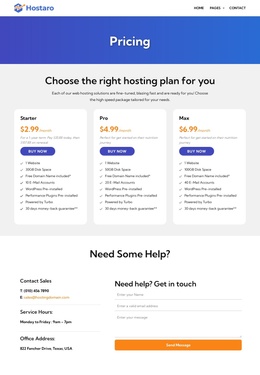
The heading and supporting paragraph establish one focused information area before the three plan cards present the available hosting packages. In a Joomla-managed project, this organization can work as a stable content region for structured service information: Starter, Pro, and Max remain visibly comparable, while the broader site can provide navigation and other editorial areas around the section.
The cards contain useful content groupings for a hosting offer. Their monthly prices are $2.99, $4.99, and $6.99, and the included allowances progress from 30GB to 50GB and 100GB of disk space, with 10, 20, and 40 email accounts. Each plan also lists one website, a free domain, pre-installed WordPress, performance plugins, Turbo support, and a 30-day money-back guarantee. Those repeated fields make the section suitable for presenting organized package information without turning it into a complete CMS site structure.
The light gray background, white rounded surfaces, orange prices, and blue buy now buttons keep the content visually readable while the surrounding Joomla-managed page handles wider content organization. The block can therefore remain a recognizable pricing region within a larger site.
Customize with Nicepage
Open this ready-made template in the Joomla Page Builder and customize it visually in the Nicepage editor. Replace demo content, edit page sections, and adapt the design to your project without rebuilding the template from scratch.
Edit Template Offline
2. Create a new page or select existing
3. Click Add new block, search for id 6513654 and click enter
Edit Template Online
Create Awesome Websites


Free Nicepage Builder
Keywords
Work With This Template in Joomla
Customize and Install the Joomla Template
Start with this ready-made template instead of building the Joomla design from scratch. Customize its layout, content, typography, images, sections, and other design elements visually in the Nicepage application, then export and install the Joomla Template, Nicepage Extension, and supported content on your Joomla website.
Edit the Template Directly in Joomla
After installation, you can edit the Joomla Template directly in Joomla with the Nicepage Joomla Extension. Customize the Header, Footer, Colors, Fonts, typography, and Page Templates from the Joomla workflow while keeping the site design connected with your CMS content.
Edit Joomla Articles Visually
Use the Nicepage Joomla Extension to open and edit Joomla Articles visually from the Joomla Administrator. Change text, images, sections, layouts, and other page content in the Nicepage editor while continuing to manage the Articles through Joomla.
Joomla Content and Template Integration
Use the customized template together with Joomla Articles, module Positions, menus, forms, Blog Pages, and other supported CMS elements. With the Nicepage Extension used as the Site Style Source, shared design settings can be applied across Joomla Articles while Joomla continues to provide the CMS environment for managing site content.
This workflow combines a ready-made Joomla Template with visual customization, direct template editing in Joomla, and continued content management through the Nicepage Joomla Extension.