Car rental Joomla Template

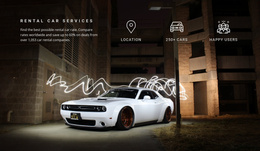
The Car rental block provides one clearly bounded automotive-care section that can participate in a Joomla-managed page. Its content model is intentionally compact: one heading about complete auto care for every make and model, one full-width silver sports car photograph, and one magenta accent line. The heading is overlaid in the upper-left over a darker part of the image, making the offering readable while preserving the image-led composition. With static interaction and no confirmed CMS-specific component inside it, the section functions as a focused informational region within a broader site.
ID : 55278   |   Category : Text On Image, Cars & Transportation

The Vehicle Image Frames a Structured Auto-Care Message

The heading and image form a compact informational unit: the silver sports car supplies immediate automotive context, while the overlaid statement explains that the offering covers complete auto care for every make and model. Its upper-left placement creates a recognizable content region within the full-width photograph, and the white lettering is supported by the darker image area beneath it. The magenta line adds a visual boundary to that region without introducing another item or action.

In a Joomla-oriented project, this arrangement can serve as a stable content section on a page where structured automotive information is managed around the design. The block can retain its visual role as an introduction while neighboring content handles detailed services, vehicle information, contact details, or other site functions. The CMS context changes how the surrounding project may maintain content; it does not change the verified one-region structure of this section.

Because the block is static and contains no confirmed form, gallery, slider, or Joomla-specific module, its strongest contribution is clarity. It gives a Joomla-managed page an image-led opening statement that can remain visually distinct while related informational regions are organized elsewhere. The white heading, gray vehicle scene, and magenta accent also provide concrete visual cues for coordinating adjacent content without treating this section as a complete template or site.

Customize with Nicepage

Open this ready-made template in the Joomla Page Builder and customize it visually in the Nicepage editor. Replace demo content, edit page sections, and adapt the design to your project without rebuilding the template from scratch.

Edit Template Offline

1. Download and Install the Nicepage application for Windows and Mac. Or WordPress and Joomla plugins from the download page
2. Create a new page or select existing
3. Click Add new block, search for id 55278 and click enter

Edit Template Online

Run Online Builder to edit this template on our hosting

Create Awesome Websites

WordPress Plugin WordPress
Windows Application Windows App
Joomla Plugin Joomla
Mac OS Application Mac OS App
HTML5 HTML5
Online Builder Online

Free Nicepage Builder

15,000+ Templates
Easy Drag-n-Drop
No Coding
Mobile-Friendly

Keywords


Work With This Template in Joomla

Customize and Install the Joomla Template

Start with this ready-made template instead of building the Joomla design from scratch. Customize its layout, content, typography, images, sections, and other design elements visually in the Nicepage application, then export and install the Joomla Template, Nicepage Extension, and supported content on your Joomla website.

Edit the Template Directly in Joomla

After installation, you can edit the Joomla Template directly in Joomla with the Nicepage Joomla Extension. Customize the Header, Footer, Colors, Fonts, typography, and Page Templates from the Joomla workflow while keeping the site design connected with your CMS content.

Edit Joomla Articles Visually

Use the Nicepage Joomla Extension to open and edit Joomla Articles visually from the Joomla Administrator. Change text, images, sections, layouts, and other page content in the Nicepage editor while continuing to manage the Articles through Joomla.

Joomla Content and Template Integration

Use the customized template together with Joomla Articles, module Positions, menus, forms, Blog Pages, and other supported CMS elements. With the Nicepage Extension used as the Site Style Source, shared design settings can be applied across Joomla Articles while Joomla continues to provide the CMS environment for managing site content.

This workflow combines a ready-made Joomla Template with visual customization, direct template editing in Joomla, and continued content management through the Nicepage Joomla Extension.

Editing Joomla content visually with Nicepage

More from Cars & Transportation Joomla Templates