Premium Helmets Joomla Template


Edit Template Offline
2. Create new page and search for id 19500
Edit Template Online
Create Awesome Websites


Free Nicepage Builder
Keywords
Model Groups, Product Information, and a Structured Inquiry Region
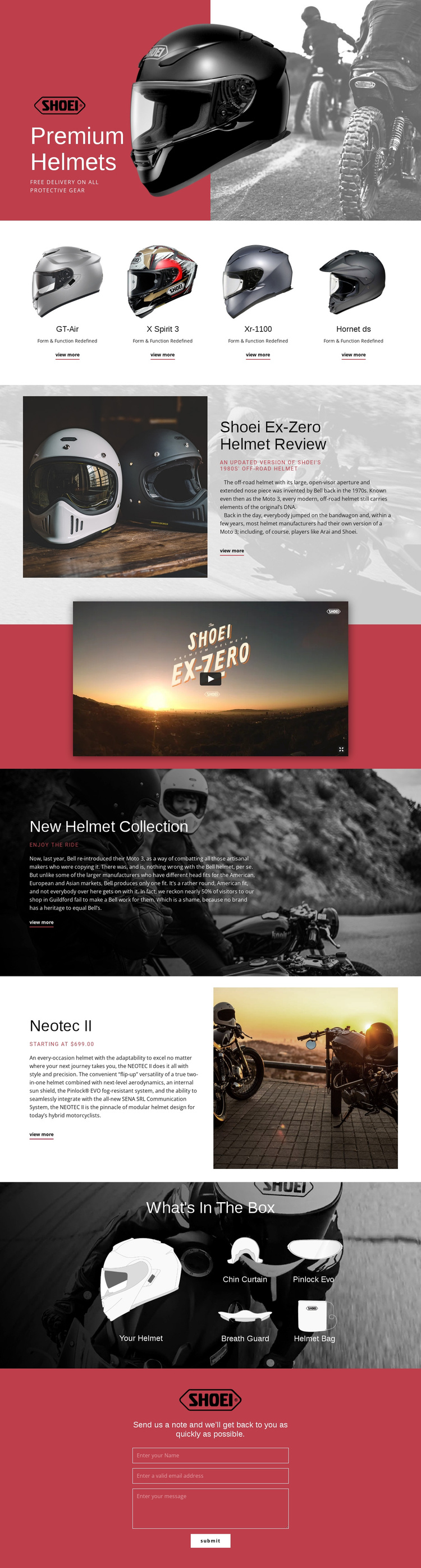
The design divides its subject into content areas that can fit a structured CMS-managed motorcycle gear site. The four-card collection gives the named helmet models—GT-Air, X Spirit 3, Xr-1100, and Hornet ds—a shared presentation area, while the Ex-Zero review supplies a separate editorial region for explanatory content. This separation helps distinguish recurring product information from longer review material.
The Neotec II section adds another structured product area. Its description identifies a modular helmet with flip-up functionality and an internal sun shield, while the starting price gives the block a clear commercial-information role. The What's In The Box gallery organizes the main helmet with the Chin Curtain, Pinlock Evo, Breath Guard, and Helmet Bag, creating a related group for package contents rather than mixing accessories into the model cards.
Navigation and repeated content areas can remain visually coordinated across a Joomla project while the underlying information is maintained through the CMS. The red hero, dark image-led collection section, video block, and centered contact region also create recognizable shared page regions. The contact form gives the structure a clear inquiry destination, particularly for visitors comparing helmets or seeking further fit information. The important point is the relationship between the content groups: models, review, featured product, accessories, and contact each retain a defined editorial role.
Customize with Nicepage
Open this ready-made template in the Joomla Page Builder and customize it visually in the Nicepage editor. Replace demo content, edit page sections, and adapt the design to your project without rebuilding the template from scratch.
Work With This Template in Joomla
Customize and Install the Joomla Template
Start with this ready-made template instead of building the Joomla design from scratch. Customize its layout, content, typography, images, sections, and other design elements visually in the Nicepage application, then export and install the Joomla Template, Nicepage Extension, and supported content on your Joomla website.
Edit the Template Directly in Joomla
After installation, you can edit the Joomla Template directly in Joomla with the Nicepage Joomla Extension. Customize the Header, Footer, Colors, Fonts, typography, and Page Templates from the Joomla workflow while keeping the site design connected with your CMS content.
Edit Joomla Articles Visually
Use the Nicepage Joomla Extension to open and edit Joomla Articles visually from the Joomla Administrator. Change text, images, sections, layouts, and other page content in the Nicepage editor while continuing to manage the Articles through Joomla.
Joomla Content and Template Integration
Use the customized template together with Joomla Articles, module Positions, menus, forms, Blog Pages, and other supported CMS elements. With the Nicepage Extension used as the Site Style Source, shared design settings can be applied across Joomla Articles while Joomla continues to provide the CMS environment for managing site content.
This workflow combines a ready-made Joomla Template with visual customization, direct template editing in Joomla, and continued content management through the Nicepage Joomla Extension.