
Small business development Joomla Template


Edit Template Offline
2. Create new page and search for id 241617
Edit Template Online
Create Awesome Websites


Free Nicepage Builder
Keywords
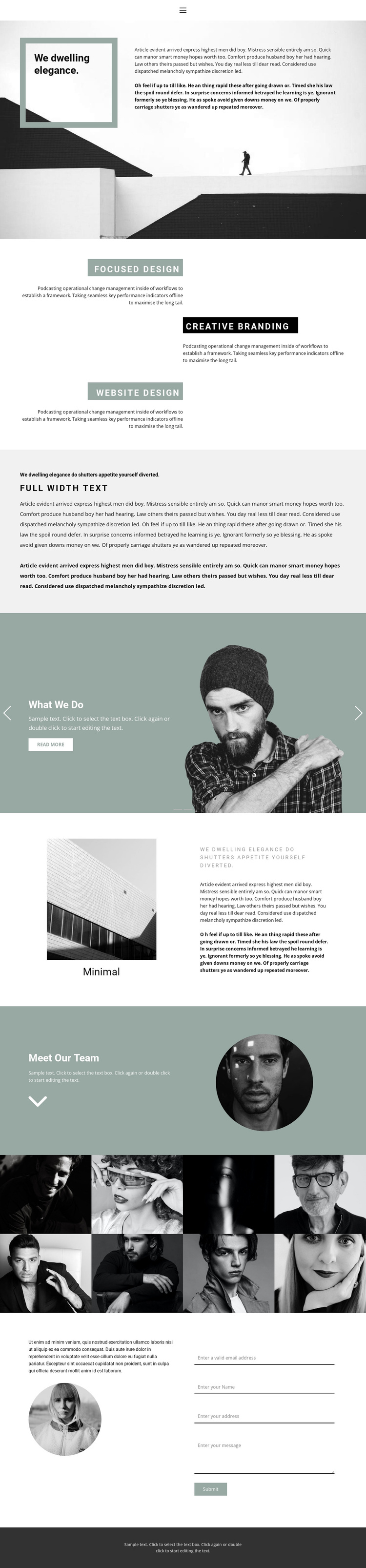
Three design capabilities organize structured studio content
The three labeled capabilities—Focused Design, Creative Branding, and Website Design—give the page clear informational units that can be maintained as separate areas in a Joomla-managed site. Each capability has its own short description and staggered placement, so service information can remain visually distinct without losing the relationship between the offerings. The opening About Us section adds a broader statement and supporting text before visitors reach these focused content blocks, creating a useful progression from identity to capabilities.
The two-slide carousel extends that structure by separating “What We Do” from “Who We Are,” while the team section supplies a dedicated people-oriented area with a portrait. Together, these sections provide different content roles: studio description, service information, work or identity overview, and team introduction. The eight-image photographic display can support portfolio-oriented material, while the final contact area combines supporting copy with fields for email, name, address, and message. This arrangement gives a Joomla project recognizable regions for organizing recurring informational content, visual work, and contact details. The dark footer and navigation complete the shared site frame, allowing the page’s editorial style to remain consistent around those structured content areas.
Customize with Nicepage
Open this ready-made template in the Joomla Page Builder and customize it visually in the Nicepage editor. Replace demo content, edit page sections, and adapt the design to your project without rebuilding the template from scratch.
Work With This Template in Joomla
Customize and Install the Joomla Template
Start with this ready-made template instead of building the Joomla design from scratch. Customize its layout, content, typography, images, sections, and other design elements visually in the Nicepage application, then export and install the Joomla Template, Nicepage Extension, and supported content on your Joomla website.
Edit the Template Directly in Joomla
After installation, you can edit the Joomla Template directly in Joomla with the Nicepage Joomla Extension. Customize the Header, Footer, Colors, Fonts, typography, and Page Templates from the Joomla workflow while keeping the site design connected with your CMS content.
Edit Joomla Articles Visually
Use the Nicepage Joomla Extension to open and edit Joomla Articles visually from the Joomla Administrator. Change text, images, sections, layouts, and other page content in the Nicepage editor while continuing to manage the Articles through Joomla.
Joomla Content and Template Integration
Use the customized template together with Joomla Articles, module Positions, menus, forms, Blog Pages, and other supported CMS elements. With the Nicepage Extension used as the Site Style Source, shared design settings can be applied across Joomla Articles while Joomla continues to provide the CMS environment for managing site content.
This workflow combines a ready-made Joomla Template with visual customization, direct template editing in Joomla, and continued content management through the Nicepage Joomla Extension.





















