Futuristic standout business Joomla Template


Edit Template Offline
2. Create new page and search for id 61991
Edit Template Online
Create Awesome Websites


Free Nicepage Builder
Keywords
Company Principles and Contact Regions Suit Structured CMS Content
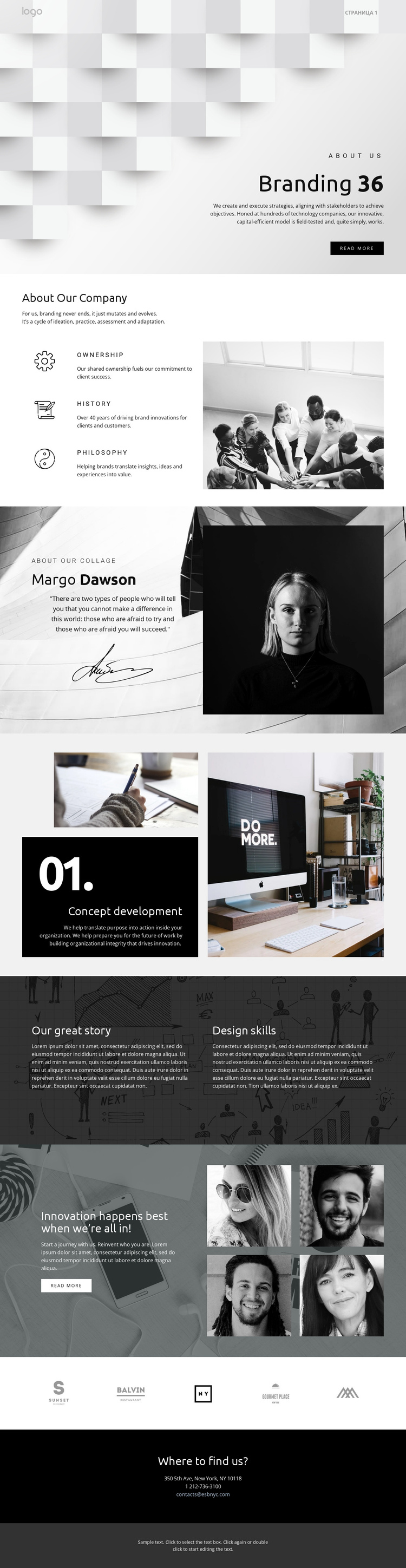
The page divides branding information into clear editorial regions that can be understood as separate CMS-managed content areas. About Our Company groups Ownership, History, and Philosophy beside a large photograph, giving the profile a structured overview before the page moves to the named Concept development capability. That capability has its own numbered panel and supporting images, so it can remain visually distinct from the broader company narrative.
The profile-style quote section introduces another content relationship: a person-oriented statement, signature image, and portrait are presented together rather than mixed into the service description. The later Our great story section separates Design skills from a second text-led theme over a dark photographic background. These distinctions could help organize recurring informational material while keeping each region connected to the same visual system. The five-mark row supplies a compact showcase area, and the navigation header provides a consistent route between the page's major regions.
The closing Where to find us? section gathers the email link, telephone number, and street address into one contact region. In a Joomla project, that separation is useful for a CMS-managed page whose services, company information, visual showcase, and contact details may need to remain organized as related but distinct content. The design therefore provides structured editorial zones without claiming that Joomla Articles or modules already exist in the template.
Customize with Nicepage
Open this ready-made template in the Joomla Page Builder and customize it visually in the Nicepage editor. Replace demo content, edit page sections, and adapt the design to your project without rebuilding the template from scratch.
Work With This Template in Joomla
Customize and Install the Joomla Template
Start with this ready-made template instead of building the Joomla design from scratch. Customize its layout, content, typography, images, sections, and other design elements visually in the Nicepage application, then export and install the Joomla Template, Nicepage Extension, and supported content on your Joomla website.
Edit the Template Directly in Joomla
After installation, you can edit the Joomla Template directly in Joomla with the Nicepage Joomla Extension. Customize the Header, Footer, Colors, Fonts, typography, and Page Templates from the Joomla workflow while keeping the site design connected with your CMS content.
Edit Joomla Articles Visually
Use the Nicepage Joomla Extension to open and edit Joomla Articles visually from the Joomla Administrator. Change text, images, sections, layouts, and other page content in the Nicepage editor while continuing to manage the Articles through Joomla.
Joomla Content and Template Integration
Use the customized template together with Joomla Articles, module Positions, menus, forms, Blog Pages, and other supported CMS elements. With the Nicepage Extension used as the Site Style Source, shared design settings can be applied across Joomla Articles while Joomla continues to provide the CMS environment for managing site content.
This workflow combines a ready-made Joomla Template with visual customization, direct template editing in Joomla, and continued content management through the Nicepage Joomla Extension.