Elegant solutions in business Joomla Template


Edit Template Offline
2. Create new page and search for id 12619
Edit Template Online
Create Awesome Websites


Free Nicepage Builder
Keywords
Capability Groups and Contact Regions Suit Structured CMS Content
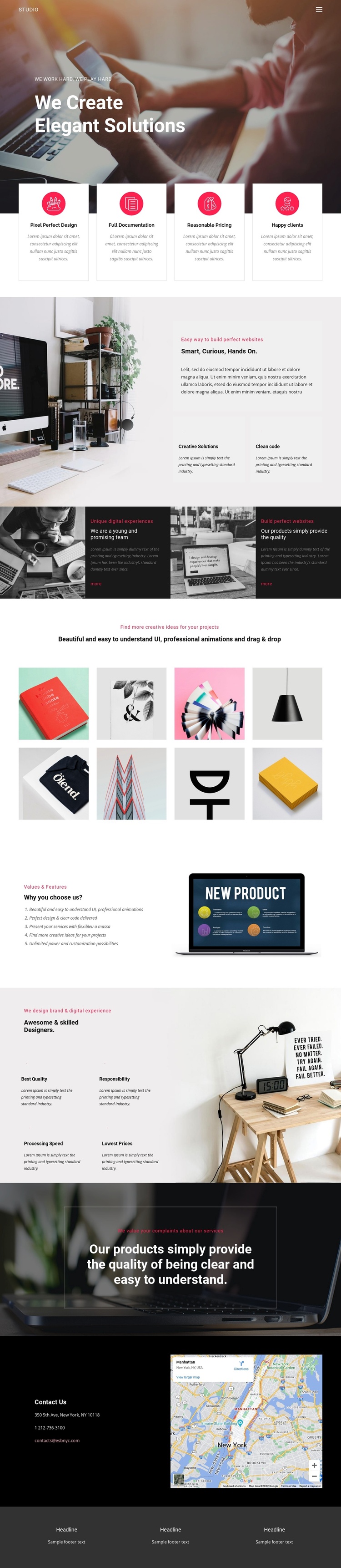
The four capability cards divide the opening message into recurring informational units: Pixel Perfect Design, Full Documentation, Reasonable Pricing, and the sample “Happy clients” label. That division is useful for a CMS-managed studio presentation because each item has a clear heading-and-description role while remaining visually coordinated beneath the hero. The following split section adds a broader studio explanation and two supporting features, giving the page another structured content region.
Further down, the alternating tiles separate image-led statements from dark text panels, while the eight-image gallery provides a distinct portfolio area. The five-item values list and the four designer capability items create additional repeatable groups, but they remain part of one continuous visual system. This combination of navigation, repeated information blocks, portfolio content, and a shared footer can support organized Joomla site content without claiming that specific Joomla Articles or module positions already exist in the template.
The contact section gives the structure a practical endpoint: contact details appear beside a visible map, making location and communication content easy to identify. A Joomla project can preserve that relationship while managing the page’s recurring content through the CMS. Nicepage’s Joomla Extension is an optional bridge for creating and designing Joomla Articles, but the template-specific value remains its clear division of studio information, portfolio material, and contact regions.
Customize with Nicepage
Open this ready-made template in the Joomla Page Builder and customize it visually in the Nicepage editor. Replace demo content, edit page sections, and adapt the design to your project without rebuilding the template from scratch.
Work With This Template in Joomla
Customize and Install the Joomla Template
Start with this ready-made template instead of building the Joomla design from scratch. Customize its layout, content, typography, images, sections, and other design elements visually in the Nicepage application, then export and install the Joomla Template, Nicepage Extension, and supported content on your Joomla website.
Edit the Template Directly in Joomla
After installation, you can edit the Joomla Template directly in Joomla with the Nicepage Joomla Extension. Customize the Header, Footer, Colors, Fonts, typography, and Page Templates from the Joomla workflow while keeping the site design connected with your CMS content.
Edit Joomla Articles Visually
Use the Nicepage Joomla Extension to open and edit Joomla Articles visually from the Joomla Administrator. Change text, images, sections, layouts, and other page content in the Nicepage editor while continuing to manage the Articles through Joomla.
Joomla Content and Template Integration
Use the customized template together with Joomla Articles, module Positions, menus, forms, Blog Pages, and other supported CMS elements. With the Nicepage Extension used as the Site Style Source, shared design settings can be applied across Joomla Articles while Joomla continues to provide the CMS environment for managing site content.
This workflow combines a ready-made Joomla Template with visual customization, direct template editing in Joomla, and continued content management through the Nicepage Joomla Extension.