Services of our guides WordPress Theme


Stable Nature Categories in a WordPress-Managed Page
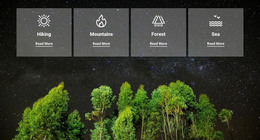
The four repeated cards read as durable page content rather than as a single temporary message. Hiking, Mountains, Forest, and Sea are named category units, and each unit offers the same visual path: an icon, a label, and a Read More link. In a WordPress-oriented project, that makes the block suitable for a stable nature or guide-related page section where visitors can choose which category to explore next.
The visual arrangement supports that content role without adding unnecessary hierarchy. A full-width forest image beneath a starry sky provides one shared setting, while the semi-transparent charcoal cards create four separate surfaces for the category information. White icons and labels remain visible against the dark treatment, and the underlined links distinguish the onward action from the category names. Because the cards are evenly aligned in one row, their parallel meaning is apparent before a visitor selects one.
Within a WordPress-managed site, this section can remain a consistent page-content area while other parts of the project handle navigation, detailed category information, or regularly changed material. The block itself contributes the visual grouping and four entry points; it does not need to become a complete theme or site. Its usefulness lies in giving a publishable page a recognizable category region that can sit alongside other content without losing the relationship between the scenic background and the four linked choices.
Customize with Nicepage
Open this ready-made template in the WordPress Website Builder and customize it visually in the Nicepage editor. Replace demo content, edit page sections, and adapt the design to your project without rebuilding the template from scratch.
Edit Template Offline
2. Create a new page or select existing
3. Click Add new block, search for id 92757 and click enter
Edit Template Online
Create Awesome Websites


Free Nicepage Builder
Keywords
Manage and Edit This Theme in WordPress
Customize and Install the WordPress Theme
Start with this ready-made theme instead of building the WordPress design from scratch. Customize its layout, content, typography, images, sections, and other design elements visually in Nicepage editor, then export and install the WordPress Theme, Plugin, and Pages on your WordPress site. The Nicepage WordPress Plugin lets you continue working with the site after installation.
Edit the Theme Directly in WordPress
After installation, you can edit the WordPress Theme directly in WordPress with the Nicepage WordPress Plugin. Use Site Style to customize site Colors, Fonts, Header, Footer, Blog, and Post Page Templates while working within your WordPress website.
Edit WordPress Pages Visually
Use the Nicepage WordPress Plugin to edit page content directly from the WordPress admin area. Open a WordPress Page with Nicepage and visually change its text, images, sections, and other page elements while continuing to manage the Page through WordPress.
WordPress Content and Theme Integration
Use the customized theme with WordPress Pages, Posts, Blog and Post Templates, menus, widgets, and other CMS-managed content. Shared theme elements such as Colors, Fonts, Header, Footer, Blog, and Post Page Templates can be managed as part of the overall site design, while WordPress provides the CMS environment for managing site content.
This workflow combines a ready-made WordPress Theme with visual customization, direct theme editing in WordPress, and continued content management through the Nicepage WordPress Plugin.