
Nika's Agency WordPress Theme


Edit Template Offline
2. Create new page and search for id 23743
Edit Template Online
Create Awesome Websites


Free Nicepage Builder
Keywords
Visual Portfolio Areas Leave Room for WordPress-Managed Agency Content
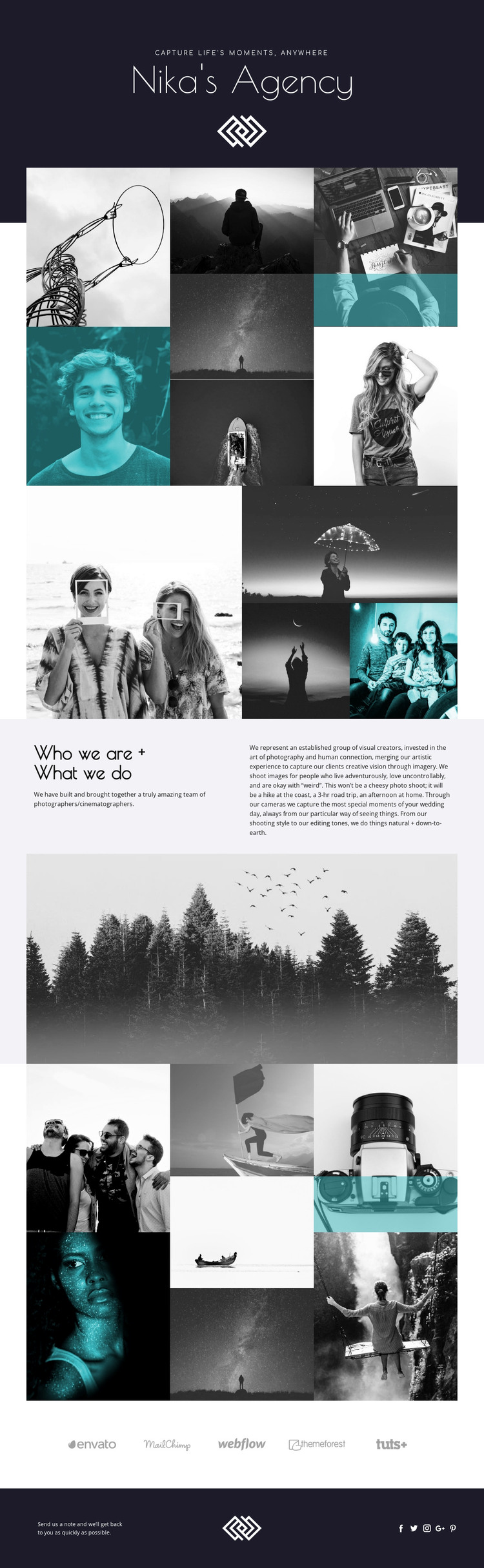
The design separates permanent page information into areas that can be interpreted naturally in a WordPress environment. The two-column “Who we are + What we do” section is suited to page-oriented agency content: one side introduces the team, while the longer side explains photography and cinematography services, wedding-day imagery, and natural, down-to-earth editing. This gives written content a defined role without reducing the page to a text-heavy business layout.
The galleries provide a different publishing emphasis. Three photographic mosaics make visual work the main evidence of the agency’s offer, with seven panels in the first and final arrangements and a large image paired with stacked images in the middle arrangement. Projects, portfolio entries, or other recurring visual content could be organized around these areas as the site develops, but the current analysis confirms the design’s gallery structure rather than a pre-existing WordPress post system. The full-width forest image adds a flexible atmospheric break between content groups.
Shared site elements reinforce the theme interpretation. The dark opening area establishes the agency identity, and the footer combines a contact prompt, centered mark, and five social links. A WordPress project could therefore keep permanent agency information, evolving visual work, navigation, and social-facing content within one consistent visual system, while preserving the page’s editorial balance instead of treating the theme as a generic gallery shell.
Customize with Nicepage
Open this ready-made template in the WordPress Website Builder and customize it visually in the Nicepage editor. Replace demo content, edit page sections, and adapt the design to your project without rebuilding the template from scratch.
Manage and Edit This Theme in WordPress
Customize and Install the WordPress Theme
Start with this ready-made theme instead of building the WordPress design from scratch. Customize its layout, content, typography, images, sections, and other design elements visually in Nicepage editor, then export and install the WordPress Theme, Plugin, and Pages on your WordPress site. The Nicepage WordPress Plugin lets you continue working with the site after installation.
Edit the Theme Directly in WordPress
After installation, you can edit the WordPress Theme directly in WordPress with the Nicepage WordPress Plugin. Use Site Style to customize site Colors, Fonts, Header, Footer, Blog, and Post Page Templates while working within your WordPress website.
Edit WordPress Pages Visually
Use the Nicepage WordPress Plugin to edit page content directly from the WordPress admin area. Open a WordPress Page with Nicepage and visually change its text, images, sections, and other page elements while continuing to manage the Page through WordPress.
WordPress Content and Theme Integration
Use the customized theme with WordPress Pages, Posts, Blog and Post Templates, menus, widgets, and other CMS-managed content. Shared theme elements such as Colors, Fonts, Header, Footer, Blog, and Post Page Templates can be managed as part of the overall site design, while WordPress provides the CMS environment for managing site content.
This workflow combines a ready-made WordPress Theme with visual customization, direct theme editing in WordPress, and continued content management through the Nicepage WordPress Plugin.





















