
Capable people in businesses WordPress Theme


Edit Template Offline
2. Create new page and search for id 75288
Edit Template Online
Create Awesome Websites


Free Nicepage Builder
Keywords
Topic Areas and Profile Content Suit a Managed Strategy Theme
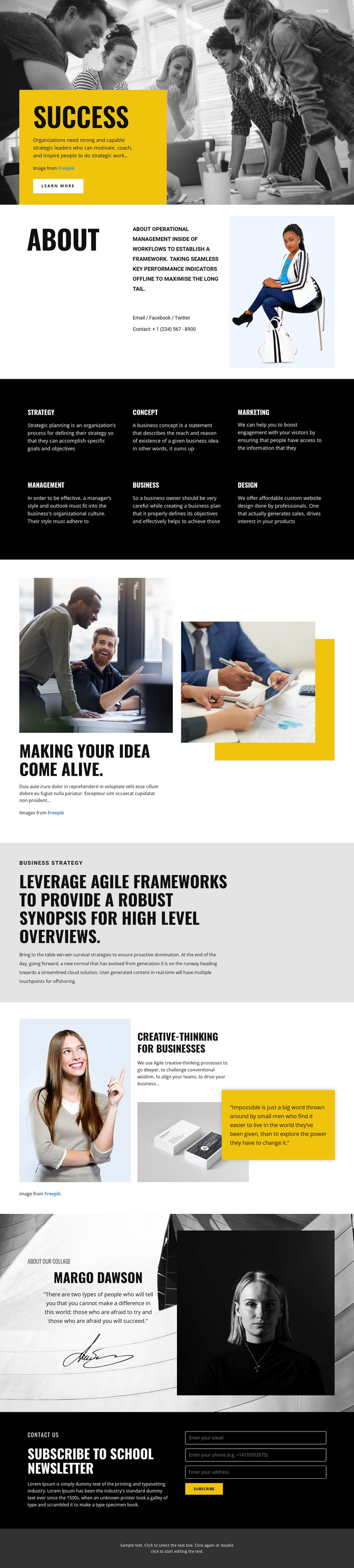
The page divides its subject into clear content areas that can remain visually coordinated in a WordPress-managed theme. The hero establishes the main direction through SUCCESS messaging, a workplace photograph, a yellow panel, and a Learn more action. The About section can serve as page-oriented context, while the six topic labels provide a reusable editorial grouping: Strategy, Concept, Marketing, Management, Business, and Design. Their concise, repeated presentation gives related content a consistent visual relationship.
The more detailed sections create additional types of page content without changing the design character. The idea-development block pairs two workplace photographs with a strong message, the agile-framework section supports longer explanatory copy, and the creative-thinking area combines portrait and product imagery with a highlighted quote. These relationships allow a strategy site to distinguish broad subject categories from featured explanations or educational highlights. The profile section adds biography text, a signature graphic, and a monochrome portrait, giving the theme a defined author or expert-content area based on the verified structure rather than an invented organization.
The closing newsletter block provides a practical audience-contact region with a subscription heading, description, name input, email input, and Subscribe button. In a WordPress project, these page areas can support permanent informational content and regularly updated editorial material while preserving the black, white, grayscale, and yellow visual language. The theme’s value lies in connecting those different content roles through one recognizable presentation.
Customize with Nicepage
Open this ready-made template in the WordPress Website Builder and customize it visually in the Nicepage editor. Replace demo content, edit page sections, and adapt the design to your project without rebuilding the template from scratch.
Manage and Edit This Theme in WordPress
Customize and Install the WordPress Theme
Start with this ready-made theme instead of building the WordPress design from scratch. Customize its layout, content, typography, images, sections, and other design elements visually in Nicepage editor, then export and install the WordPress Theme, Plugin, and Pages on your WordPress site. The Nicepage WordPress Plugin lets you continue working with the site after installation.
Edit the Theme Directly in WordPress
After installation, you can edit the WordPress Theme directly in WordPress with the Nicepage WordPress Plugin. Use Site Style to customize site Colors, Fonts, Header, Footer, Blog, and Post Page Templates while working within your WordPress website.
Edit WordPress Pages Visually
Use the Nicepage WordPress Plugin to edit page content directly from the WordPress admin area. Open a WordPress Page with Nicepage and visually change its text, images, sections, and other page elements while continuing to manage the Page through WordPress.
WordPress Content and Theme Integration
Use the customized theme with WordPress Pages, Posts, Blog and Post Templates, menus, widgets, and other CMS-managed content. Shared theme elements such as Colors, Fonts, Header, Footer, Blog, and Post Page Templates can be managed as part of the overall site design, while WordPress provides the CMS environment for managing site content.
This workflow combines a ready-made WordPress Theme with visual customization, direct theme editing in WordPress, and continued content management through the Nicepage WordPress Plugin.





















