Yoga therapy course WordPress Theme


Yoga Imagery as Stable Page Content
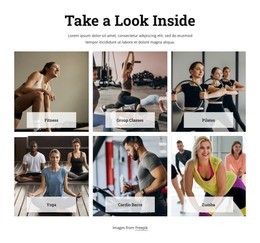
The three vertical photographs give this section a clear page-content role: they introduce yoga through repeated visual examples rather than through a long written explanation. Each image shows a pose performed indoors on a mat, and the shared warm neutral setting keeps the content visually consistent. The heading “yoga,” positioned over the middle panel in white uppercase lettering, identifies the subject at the center of the composition and helps the section read as a deliberate content area.
In a WordPress-managed page, this block can provide permanent introductory or thematic content around which other page material is arranged. The three panels can establish the visual context for supporting text about practice, wellbeing, or course information, while the surrounding project handles longer descriptions and page-specific actions. The block itself remains a contained section: it does not require the assumption of posts, categories, widgets, or a complete theme structure to perform this visual role.
The right-edge arrow is visible within the section, but the confirmed interaction is static, so it is best treated as a directional visual cue rather than a claimed working control. That distinction keeps the page content interpretation grounded in what the section visibly presents. A WordPress-oriented workflow can place this design within a broader theme and manage surrounding content, while the three-panel imagery and centered title preserve the block’s own identity.
Customize with Nicepage
Open this ready-made template in the WordPress Website Builder and customize it visually in the Nicepage editor. Replace demo content, edit page sections, and adapt the design to your project without rebuilding the template from scratch.
Edit Template Offline
2. Create a new page or select existing
3. Click Add new block, search for id 67818 and click enter
Edit Template Online
Create Awesome Websites


Free Nicepage Builder
Keywords
Manage and Edit This Theme in WordPress
Customize and Install the WordPress Theme
Start with this ready-made theme instead of building the WordPress design from scratch. Customize its layout, content, typography, images, sections, and other design elements visually in Nicepage editor, then export and install the WordPress Theme, Plugin, and Pages on your WordPress site. The Nicepage WordPress Plugin lets you continue working with the site after installation.
Edit the Theme Directly in WordPress
After installation, you can edit the WordPress Theme directly in WordPress with the Nicepage WordPress Plugin. Use Site Style to customize site Colors, Fonts, Header, Footer, Blog, and Post Page Templates while working within your WordPress website.
Edit WordPress Pages Visually
Use the Nicepage WordPress Plugin to edit page content directly from the WordPress admin area. Open a WordPress Page with Nicepage and visually change its text, images, sections, and other page elements while continuing to manage the Page through WordPress.
WordPress Content and Theme Integration
Use the customized theme with WordPress Pages, Posts, Blog and Post Templates, menus, widgets, and other CMS-managed content. Shared theme elements such as Colors, Fonts, Header, Footer, Blog, and Post Page Templates can be managed as part of the overall site design, while WordPress provides the CMS environment for managing site content.
This workflow combines a ready-made WordPress Theme with visual customization, direct theme editing in WordPress, and continued content management through the Nicepage WordPress Plugin.