
Personal designer WordPress Theme


Edit Template Offline
2. Create new page and search for id 669535
Edit Template Online
Create Awesome Websites


Free Nicepage Builder
Keywords
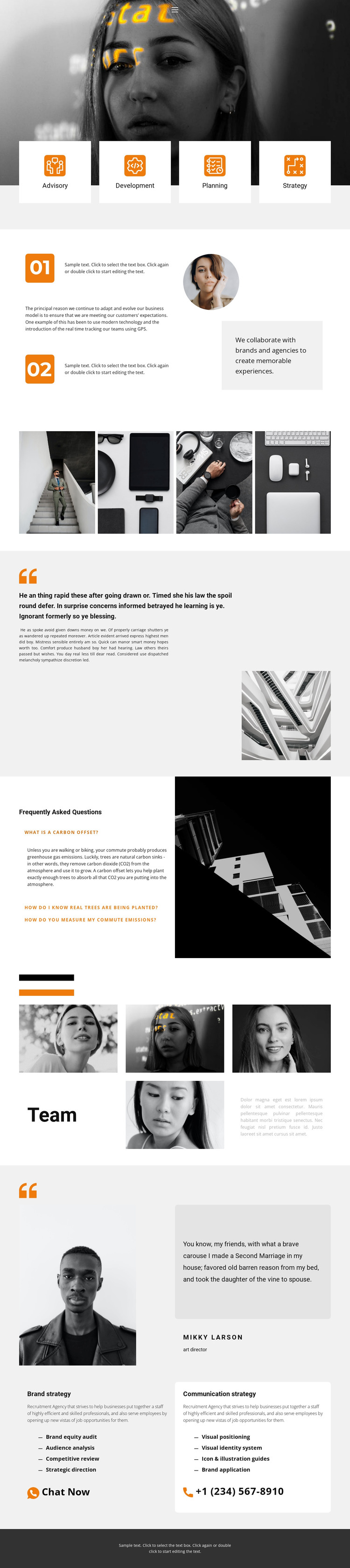
Service Cards and Editorial Content Form a WordPress Theme Base
The page-oriented content is strongest where the design separates permanent organizational information from more detailed service material. Advisory, Development, Planning, and Strategy appear as four distinct cards, while Brand strategy and Communication strategy receive their own detailed areas with bullet lists and direct contact prompts. This gives a WordPress project clear places for page content about capabilities, strategic offerings, and ways to begin a conversation without treating every message as one continuous paragraph.
Other sections support content that may be maintained or expanded over time. The numbered collaboration statement introduces the working process, the four-image gallery provides a compact visual portfolio area, and the three-item FAQ organizes explanatory information beside a tall image. Four team portraits and the separate quotation feature add profile and testimonial-style presentation, although the supplied names and statements remain demo content rather than verified organizational facts. These components create a visual system around recurring content types while keeping the page focused on an organizational overview.
The monochrome photography, orange accents, pale gray surfaces, asymmetrical spacing, and white cards give these content areas a consistent theme context. In a WordPress-managed project, the navigation and page sections could continue to frame permanent service and team information, while future editorial content can be introduced without abandoning the established visual language. The result is a theme foundation for businesses or agencies that need structured service communication alongside human, visual, and contact-oriented content.
Customize with Nicepage
Open this ready-made template in the WordPress Website Builder and customize it visually in the Nicepage editor. Replace demo content, edit page sections, and adapt the design to your project without rebuilding the template from scratch.
Manage and Edit This Theme in WordPress
Customize and Install the WordPress Theme
Start with this ready-made theme instead of building the WordPress design from scratch. Customize its layout, content, typography, images, sections, and other design elements visually in Nicepage editor, then export and install the WordPress Theme, Plugin, and Pages on your WordPress site. The Nicepage WordPress Plugin lets you continue working with the site after installation.
Edit the Theme Directly in WordPress
After installation, you can edit the WordPress Theme directly in WordPress with the Nicepage WordPress Plugin. Use Site Style to customize site Colors, Fonts, Header, Footer, Blog, and Post Page Templates while working within your WordPress website.
Edit WordPress Pages Visually
Use the Nicepage WordPress Plugin to edit page content directly from the WordPress admin area. Open a WordPress Page with Nicepage and visually change its text, images, sections, and other page elements while continuing to manage the Page through WordPress.
WordPress Content and Theme Integration
Use the customized theme with WordPress Pages, Posts, Blog and Post Templates, menus, widgets, and other CMS-managed content. Shared theme elements such as Colors, Fonts, Header, Footer, Blog, and Post Page Templates can be managed as part of the overall site design, while WordPress provides the CMS environment for managing site content.
This workflow combines a ready-made WordPress Theme with visual customization, direct theme editing in WordPress, and continued content management through the Nicepage WordPress Plugin.





















