
Modern Digital Bank WordPress Theme


Edit Template Offline
2. Create new page and search for id 6657274
Edit Template Online
Create Awesome Websites


Free Nicepage Builder
Keywords
Finance Tools and Plan Content Fit a Page-Oriented Theme Structure
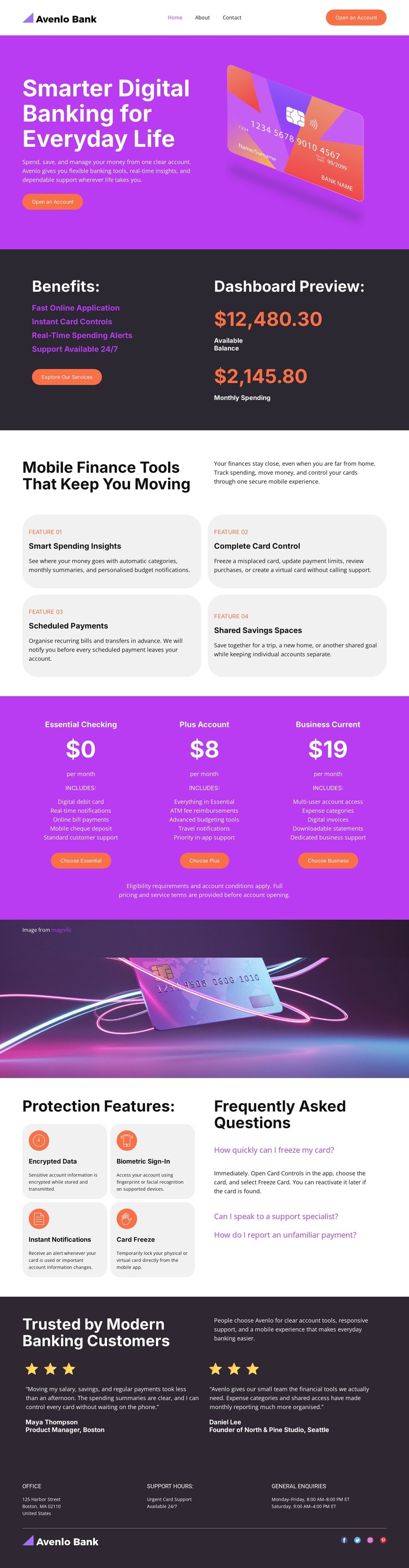
The page separates permanent banking information into clear content areas that can translate naturally into a WordPress-managed site. The hero and benefits section provide core page content for the account proposition, including fast online application, card controls, spending alerts, and dashboard information. The four finance-tool cards then create a repeatable group for explaining spending insights, complete card control, scheduled payments, and shared savings spaces.
The three account offerings introduce another page-oriented content relationship: visitors can compare Essential Checking, Plus Account, and Business Current within the same visual system. The security section adds a different kind of information, combining encrypted data, biometric sign-in, instant notifications, and card freeze with FAQ material. These areas can remain visually coordinated while the project organizes permanent service pages and any future content around them.
The testimonials and footer support the shared site layer. Two customer entries provide a defined proof region, while office information, support hours, general inquiries, and social links establish recurring contact content. The design does not prove that WordPress Posts, categories, or blog structures already exist, so those should not be treated as current template elements. Its value as a WordPress theme lies instead in the clear relationship between page content, repeated service cards, account plans, security explanations, and shared site information.
Customize with Nicepage
Open this ready-made template in the WordPress Website Builder and customize it visually in the Nicepage editor. Replace demo content, edit page sections, and adapt the design to your project without rebuilding the template from scratch.
Manage and Edit This Theme in WordPress
Customize and Install the WordPress Theme
Start with this ready-made theme instead of building the WordPress design from scratch. Customize its layout, content, typography, images, sections, and other design elements visually in Nicepage editor, then export and install the WordPress Theme, Plugin, and Pages on your WordPress site. The Nicepage WordPress Plugin lets you continue working with the site after installation.
Edit the Theme Directly in WordPress
After installation, you can edit the WordPress Theme directly in WordPress with the Nicepage WordPress Plugin. Use Site Style to customize site Colors, Fonts, Header, Footer, Blog, and Post Page Templates while working within your WordPress website.
Edit WordPress Pages Visually
Use the Nicepage WordPress Plugin to edit page content directly from the WordPress admin area. Open a WordPress Page with Nicepage and visually change its text, images, sections, and other page elements while continuing to manage the Page through WordPress.
WordPress Content and Theme Integration
Use the customized theme with WordPress Pages, Posts, Blog and Post Templates, menus, widgets, and other CMS-managed content. Shared theme elements such as Colors, Fonts, Header, Footer, Blog, and Post Page Templates can be managed as part of the overall site design, while WordPress provides the CMS environment for managing site content.
This workflow combines a ready-made WordPress Theme with visual customization, direct theme editing in WordPress, and continued content management through the Nicepage WordPress Plugin.





















