
Vintage Creative Portfolio WordPress Theme


Edit Template Offline
2. Create new page and search for id 6656680
Edit Template Online
Create Awesome Websites


Free Nicepage Builder
Keywords
Permanent Creative Pages Can Sit Beside Repeated Portfolio Content
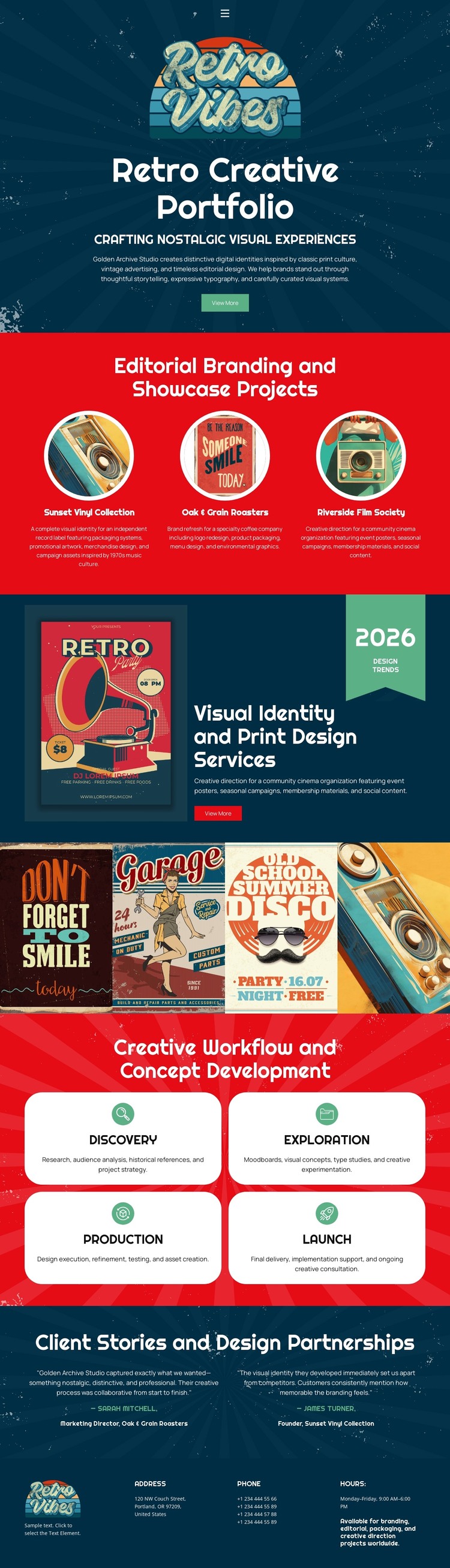
The design separates several kinds of content that a WordPress-managed creative site may need. The three featured project cards work as a page-oriented showcase of editorial branding examples, while the visual identity and print design section provides a stable service explanation with a related action. The three-panel artwork strip adds another visual collection, giving the page more than one way to present creative work without changing its central identity.
The four workflow cards—Discovery, Exploration, Production, and Launch—can remain as durable process content, while the two client story blocks provide a distinct place for partnership evidence and attribution. The footer gathers the logo, address, phone, hours, and supporting contact copy as shared site information. This arrangement allows permanent service and process material to coexist with content that may be expanded over time, such as additional project showcases or editorial updates, without claiming that blog posts or WordPress-specific structures already exist in the template. The retro palette, rounded display type, poster imagery, and separated color blocks can continue to frame those content areas as the site develops. The result is a theme interpretation grounded in the design's actual page regions rather than in CMS terminology alone.
Customize with Nicepage
Open this ready-made template in the WordPress Website Builder and customize it visually in the Nicepage editor. Replace demo content, edit page sections, and adapt the design to your project without rebuilding the template from scratch.
Manage and Edit This Theme in WordPress
Customize and Install the WordPress Theme
Start with this ready-made theme instead of building the WordPress design from scratch. Customize its layout, content, typography, images, sections, and other design elements visually in Nicepage editor, then export and install the WordPress Theme, Plugin, and Pages on your WordPress site. The Nicepage WordPress Plugin lets you continue working with the site after installation.
Edit the Theme Directly in WordPress
After installation, you can edit the WordPress Theme directly in WordPress with the Nicepage WordPress Plugin. Use Site Style to customize site Colors, Fonts, Header, Footer, Blog, and Post Page Templates while working within your WordPress website.
Edit WordPress Pages Visually
Use the Nicepage WordPress Plugin to edit page content directly from the WordPress admin area. Open a WordPress Page with Nicepage and visually change its text, images, sections, and other page elements while continuing to manage the Page through WordPress.
WordPress Content and Theme Integration
Use the customized theme with WordPress Pages, Posts, Blog and Post Templates, menus, widgets, and other CMS-managed content. Shared theme elements such as Colors, Fonts, Header, Footer, Blog, and Post Page Templates can be managed as part of the overall site design, while WordPress provides the CMS environment for managing site content.
This workflow combines a ready-made WordPress Theme with visual customization, direct theme editing in WordPress, and continued content management through the Nicepage WordPress Plugin.





















