Test your creative knowledge WordPress Theme


A Stable Interactive Content Area for WordPress Pages
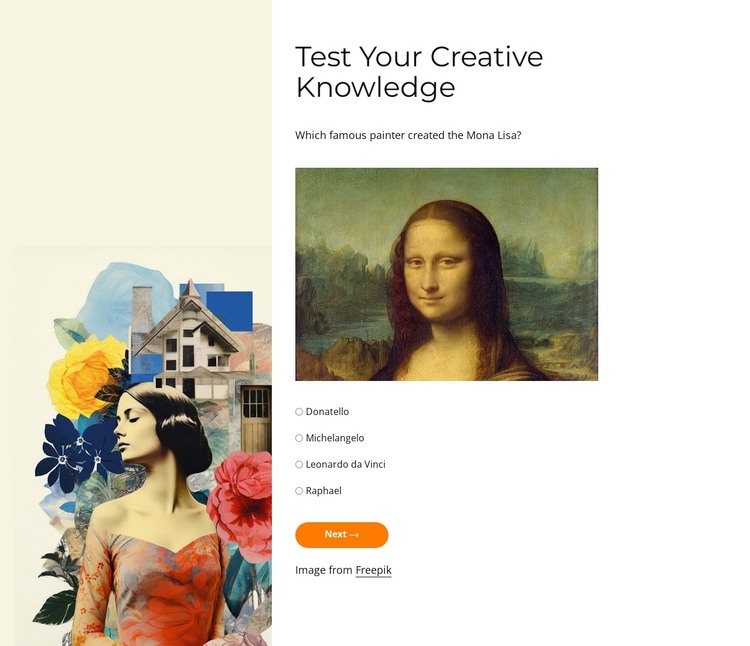
The heading and question sequence read as a defined page-content feature rather than a general site component. Four quiz steps organize the activity, and each step offers four radio-button answers before the visitor uses Next to continue. Back allows earlier choices to be reviewed, while Submit supplies the completion point for the interaction. This makes the section suitable for a WordPress-managed creative or educational page where the quiz can sit alongside other publishable content.
The content model is supported by a clear visual division. A tall, colorful artwork panel fills the left column, while the right column concentrates the two-line heading, prompt, answer group, and navigation controls. The first step asks about the painter of the Mona Lisa and displays that work, giving the visual panel a direct relationship to the question. The neutral off-white background and minimal black typography keep the interface readable, while the rounded orange button makes step movement visually distinct.
Within a broader WordPress-oriented project, this block can remain a reusable page section while other content areas handle introductions, explanations, or related posts. Its questions and artwork can be adapted to the page's editorial purpose without changing the underlying arrangement. The section contributes an interactive content unit to the surrounding theme and page structure; it is not itself a complete WordPress theme.
Customize with Nicepage
Open this ready-made template in the WordPress Website Builder and customize it visually in the Nicepage editor. Replace demo content, edit page sections, and adapt the design to your project without rebuilding the template from scratch.
Edit Template Offline
2. Create a new page or select existing
3. Click Add new block, search for id 6532002 and click enter
Edit Template Online
Create Awesome Websites


Free Nicepage Builder
Keywords
Manage and Edit This Theme in WordPress
Customize and Install the WordPress Theme
Start with this ready-made theme instead of building the WordPress design from scratch. Customize its layout, content, typography, images, sections, and other design elements visually in Nicepage editor, then export and install the WordPress Theme, Plugin, and Pages on your WordPress site. The Nicepage WordPress Plugin lets you continue working with the site after installation.
Edit the Theme Directly in WordPress
After installation, you can edit the WordPress Theme directly in WordPress with the Nicepage WordPress Plugin. Use Site Style to customize site Colors, Fonts, Header, Footer, Blog, and Post Page Templates while working within your WordPress website.
Edit WordPress Pages Visually
Use the Nicepage WordPress Plugin to edit page content directly from the WordPress admin area. Open a WordPress Page with Nicepage and visually change its text, images, sections, and other page elements while continuing to manage the Page through WordPress.
WordPress Content and Theme Integration
Use the customized theme with WordPress Pages, Posts, Blog and Post Templates, menus, widgets, and other CMS-managed content. Shared theme elements such as Colors, Fonts, Header, Footer, Blog, and Post Page Templates can be managed as part of the overall site design, while WordPress provides the CMS environment for managing site content.
This workflow combines a ready-made WordPress Theme with visual customization, direct theme editing in WordPress, and continued content management through the Nicepage WordPress Plugin.