Alaska photo tours WordPress Theme


The Coastal Image Mosaic Gives Workshop Content a Stable Page Role
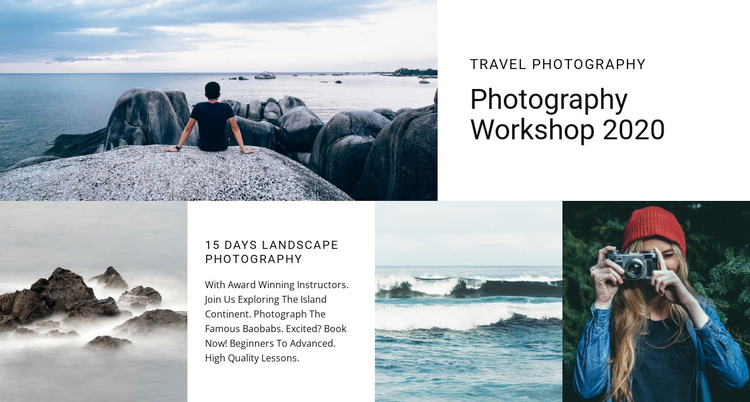
The upper-left photograph supplies immediate visual context, while the white panel beside it carries the “Photography Workshop 2020” title. Above that title, the “travel photography” label acts as a compact subject marker. These elements make the block read as stable page content: visitors can identify the workshop theme from the visual pairing before reaching the lower educational detail. The hierarchy is clear without relying on a full page layout.
Below the main pairing, three photography images alternate with a white text panel containing “15 Days Landscape Photography.” This lower arrangement lets the block move from broad workshop identity to a more focused lesson theme. The images are not isolated thumbnails; they form a continuous coastal and portrait-oriented visual sequence through their edge-to-edge rectangular crops. The separate text cell gives the repeated imagery a defined informational counterpart and prevents the section from functioning as an image-only strip.
In a WordPress-oriented project, the block can serve as a stable photography workshop section on a managed page while other content areas address enrollment, instructors, schedules, or related material. It is not a standalone WordPress Theme; its value lies in preserving this particular page-content pattern. The static interaction keeps the message visible at once, making the section appropriate for permanent, reusable presentation rather than an automatically changing content feed.
Customize with Nicepage
Open this ready-made template in the WordPress Website Builder and customize it visually in the Nicepage editor. Replace demo content, edit page sections, and adapt the design to your project without rebuilding the template from scratch.
Edit Template Offline
2. Create a new page or select existing
3. Click Add new block, search for id 64429 and click enter
Edit Template Online
Create Awesome Websites


Free Nicepage Builder
Keywords
Manage and Edit This Theme in WordPress
Customize and Install the WordPress Theme
Start with this ready-made theme instead of building the WordPress design from scratch. Customize its layout, content, typography, images, sections, and other design elements visually in Nicepage editor, then export and install the WordPress Theme, Plugin, and Pages on your WordPress site. The Nicepage WordPress Plugin lets you continue working with the site after installation.
Edit the Theme Directly in WordPress
After installation, you can edit the WordPress Theme directly in WordPress with the Nicepage WordPress Plugin. Use Site Style to customize site Colors, Fonts, Header, Footer, Blog, and Post Page Templates while working within your WordPress website.
Edit WordPress Pages Visually
Use the Nicepage WordPress Plugin to edit page content directly from the WordPress admin area. Open a WordPress Page with Nicepage and visually change its text, images, sections, and other page elements while continuing to manage the Page through WordPress.
WordPress Content and Theme Integration
Use the customized theme with WordPress Pages, Posts, Blog and Post Templates, menus, widgets, and other CMS-managed content. Shared theme elements such as Colors, Fonts, Header, Footer, Blog, and Post Page Templates can be managed as part of the overall site design, while WordPress provides the CMS environment for managing site content.
This workflow combines a ready-made WordPress Theme with visual customization, direct theme editing in WordPress, and continued content management through the Nicepage WordPress Plugin.