Solutions for a brighter future WordPress Theme



Portrait-Led Feedback Works as Stable WordPress Page Content
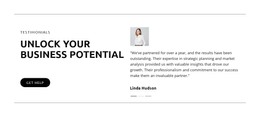
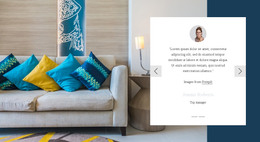
The testimonial content is organized as a stable page section rather than a stream of dated updates. The left column provides the context: an uppercase label, the heading “Unlock Your Business Potential,” and a “Get Help” button. That combination gives the section a clear relationship between customer feedback and a possible inquiry without making the block responsible for the entire response path. The right column then carries the proof through a carousel containing three slides.
Each slide uses the same content model, pairing a portrait with a quote and customer name. The repeated structure makes the section suitable for a WordPress-managed services or consulting page where the testimonial area needs to remain visually consistent as surrounding page content changes. The copy refers to strategic planning and market analysis, helping the feedback support a business-services message. The preview shows Linda Hudson as the active slide, while indicators expose the presence of two additional testimonial entries.
The block’s visual treatment reinforces its role as permanent page content. A white background and thin gray borders provide separation, black typography gives the heading priority, and the black pill-shaped “Get Help” button marks the action area. Within a WordPress project, this section can remain a reusable testimonial region while other page content handles service details, case studies, or contact information. The block supplies the feedback pattern and presentation; the wider site determines how visitors reach and continue from it.
Customize with Nicepage
Open this ready-made template in the WordPress Website Builder and customize it visually in the Nicepage editor. Replace demo content, edit page sections, and adapt the design to your project without rebuilding the template from scratch.
Edit Template Offline
2. Create a new page or select existing
3. Click Add new block, search for id 6298014 and click enter
Edit Template Online
Create Awesome Websites


Free Nicepage Builder
Keywords
Manage and Edit This Theme in WordPress
Customize and Install the WordPress Theme
Start with this ready-made theme instead of building the WordPress design from scratch. Customize its layout, content, typography, images, sections, and other design elements visually in Nicepage editor, then export and install the WordPress Theme, Plugin, and Pages on your WordPress site. The Nicepage WordPress Plugin lets you continue working with the site after installation.
Edit the Theme Directly in WordPress
After installation, you can edit the WordPress Theme directly in WordPress with the Nicepage WordPress Plugin. Use Site Style to customize site Colors, Fonts, Header, Footer, Blog, and Post Page Templates while working within your WordPress website.
Edit WordPress Pages Visually
Use the Nicepage WordPress Plugin to edit page content directly from the WordPress admin area. Open a WordPress Page with Nicepage and visually change its text, images, sections, and other page elements while continuing to manage the Page through WordPress.
WordPress Content and Theme Integration
Use the customized theme with WordPress Pages, Posts, Blog and Post Templates, menus, widgets, and other CMS-managed content. Shared theme elements such as Colors, Fonts, Header, Footer, Blog, and Post Page Templates can be managed as part of the overall site design, while WordPress provides the CMS environment for managing site content.
This workflow combines a ready-made WordPress Theme with visual customization, direct theme editing in WordPress, and continued content management through the Nicepage WordPress Plugin.