Birdwatching and hiking WordPress Theme


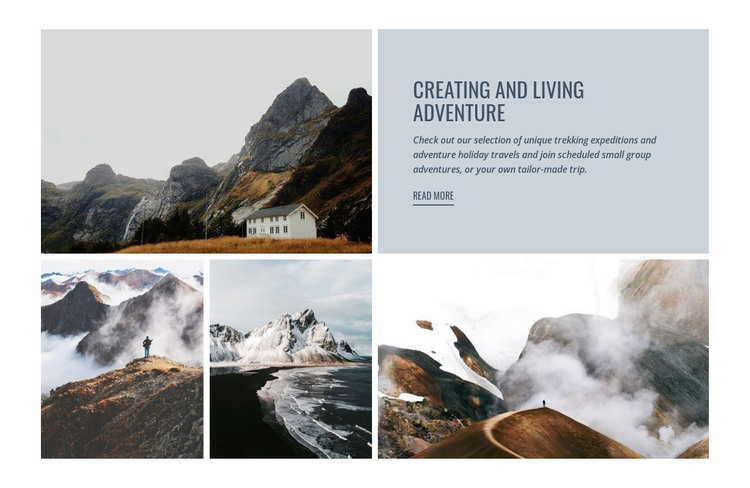
Stable Adventure Content With Supporting Alpine Imagery
The heading and supporting paragraph give this section a durable page-content role rather than the character of a time-sensitive listing. “Creating and Living Adventure” introduces trekking expeditions and adventure holiday travel, then extends the offer through references to scheduled small-group adventures and tailor-made trips. The adjacent “Read more” link can lead visitors toward fuller information, while the large mountain photograph establishes the setting before the lower row adds three further landscape views.
In a WordPress-oriented project, this block can occupy a stable travel or services area within a broader page, with the surrounding site handling navigation and other publishable content. Its visual arrangement is specific enough to preserve as a recognizable section: the blue-gray panel carries the explanation, the large image provides the main visual counterweight, and the varied lower collage adds atmosphere without changing the message. WordPress-managed content can grow around this section, but the block itself remains one reusable page component rather than a complete theme. The most useful interpretation is therefore a consistent adventure-travel content area that can sit alongside destination details, trip information, or inquiry content when those parts are supplied elsewhere.
Customize with Nicepage
Open this ready-made template in the WordPress Website Builder and customize it visually in the Nicepage editor. Replace demo content, edit page sections, and adapt the design to your project without rebuilding the template from scratch.
Edit Template Offline
2. Create a new page or select existing
3. Click Add new block, search for id 53680 and click enter
Edit Template Online
Create Awesome Websites


Free Nicepage Builder
Keywords
Manage and Edit This Theme in WordPress
Customize and Install the WordPress Theme
Start with this ready-made theme instead of building the WordPress design from scratch. Customize its layout, content, typography, images, sections, and other design elements visually in Nicepage editor, then export and install the WordPress Theme, Plugin, and Pages on your WordPress site. The Nicepage WordPress Plugin lets you continue working with the site after installation.
Edit the Theme Directly in WordPress
After installation, you can edit the WordPress Theme directly in WordPress with the Nicepage WordPress Plugin. Use Site Style to customize site Colors, Fonts, Header, Footer, Blog, and Post Page Templates while working within your WordPress website.
Edit WordPress Pages Visually
Use the Nicepage WordPress Plugin to edit page content directly from the WordPress admin area. Open a WordPress Page with Nicepage and visually change its text, images, sections, and other page elements while continuing to manage the Page through WordPress.
WordPress Content and Theme Integration
Use the customized theme with WordPress Pages, Posts, Blog and Post Templates, menus, widgets, and other CMS-managed content. Shared theme elements such as Colors, Fonts, Header, Footer, Blog, and Post Page Templates can be managed as part of the overall site design, while WordPress provides the CMS environment for managing site content.
This workflow combines a ready-made WordPress Theme with visual customization, direct theme editing in WordPress, and continued content management through the Nicepage WordPress Plugin.