Lead in a transforming world WordPress Theme


A stable services section for WordPress-managed page content
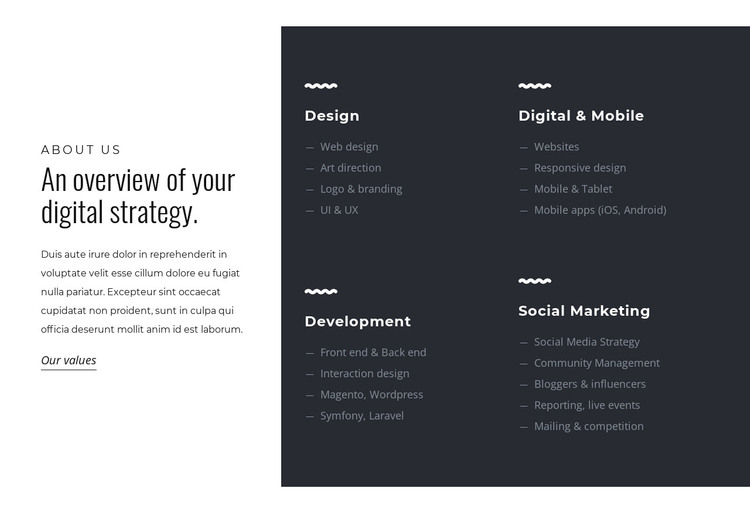
The four service cards give this block a durable content role: they group related offerings into Design, Digital & Mobile, Development, and Social Marketing rather than presenting one long paragraph. The Design card lists Web design, Art direction, Logo & branding, and UI & UX. Digital & Mobile covers Websites, Responsive design, Mobile & Tablet, and mobile apps, while Development combines front-end and back-end work with interaction design and named technologies. Social Marketing completes the set with strategy, community management, influencers, reporting, events, mailing, and competitions. These distinct groups can be read as enduring explanatory content on a services-oriented page.
Within a WordPress-managed project, the section can remain a visually consistent page-content region while the wider site handles other publishable material around it. The white panel supplies context and the “Our values” link can connect the service overview with a related information area. The charcoal panel gives the repeated cards a shared visual container, helping visitors compare categories without losing the separation between them. Since the interaction is static, the lists are immediately available rather than hidden behind a control. This makes the block suitable for a stable services page or similar content area, while WordPress manages the surrounding pages, editorial material, and broader theme environment.
Customize with Nicepage
Open this ready-made template in the WordPress Website Builder and customize it visually in the Nicepage editor. Replace demo content, edit page sections, and adapt the design to your project without rebuilding the template from scratch.
Edit Template Offline
2. Create a new page or select existing
3. Click Add new block, search for id 495976 and click enter
Edit Template Online
Create Awesome Websites


Free Nicepage Builder
Keywords
Manage and Edit This Theme in WordPress
Customize and Install the WordPress Theme
Start with this ready-made theme instead of building the WordPress design from scratch. Customize its layout, content, typography, images, sections, and other design elements visually in Nicepage editor, then export and install the WordPress Theme, Plugin, and Pages on your WordPress site. The Nicepage WordPress Plugin lets you continue working with the site after installation.
Edit the Theme Directly in WordPress
After installation, you can edit the WordPress Theme directly in WordPress with the Nicepage WordPress Plugin. Use Site Style to customize site Colors, Fonts, Header, Footer, Blog, and Post Page Templates while working within your WordPress website.
Edit WordPress Pages Visually
Use the Nicepage WordPress Plugin to edit page content directly from the WordPress admin area. Open a WordPress Page with Nicepage and visually change its text, images, sections, and other page elements while continuing to manage the Page through WordPress.
WordPress Content and Theme Integration
Use the customized theme with WordPress Pages, Posts, Blog and Post Templates, menus, widgets, and other CMS-managed content. Shared theme elements such as Colors, Fonts, Header, Footer, Blog, and Post Page Templates can be managed as part of the overall site design, while WordPress provides the CMS environment for managing site content.
This workflow combines a ready-made WordPress Theme with visual customization, direct theme editing in WordPress, and continued content management through the Nicepage WordPress Plugin.