Our favorite clients WordPress Theme


Stable Client Content Connects Recruitment Information With Logos
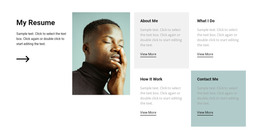
The “Our Clients” heading and recruitment-oriented paragraph form durable page content rather than a time-sensitive list of updates. They explain the section’s subject through references to recruitment, skilled professionals, and job opportunities, while the outlined “Read more” button can lead visitors toward fuller information elsewhere in the WordPress-managed page structure. The portrait beside the copy gives the text region a human visual balance.
Five client logo marks then provide a compact repeated display beneath the introduction. In a WordPress-oriented project, this section can remain a stable client or partner area while other content regions handle service details, articles, team information, or contact actions. The logo labels are demonstration content in structural terms, so they can be replaced with appropriate project assets without changing the relationship between the introductory copy and the brand row.
The black-and-white treatment helps the section remain visually consistent as page content. The serif heading, sans-serif body copy, bordered button, grayscale portrait, and spacious logo alignment form a recognizable pattern that can sit within a larger theme direction. The block participates in the CMS-managed page; it is not the WordPress Theme itself.
Customize with Nicepage
Open this ready-made template in the WordPress Website Builder and customize it visually in the Nicepage editor. Replace demo content, edit page sections, and adapt the design to your project without rebuilding the template from scratch.
Edit Template Offline
2. Create a new page or select existing
3. Click Add new block, search for id 494217 and click enter
Edit Template Online
Create Awesome Websites


Free Nicepage Builder
Keywords
Manage and Edit This Theme in WordPress
Customize and Install the WordPress Theme
Start with this ready-made theme instead of building the WordPress design from scratch. Customize its layout, content, typography, images, sections, and other design elements visually in Nicepage editor, then export and install the WordPress Theme, Plugin, and Pages on your WordPress site. The Nicepage WordPress Plugin lets you continue working with the site after installation.
Edit the Theme Directly in WordPress
After installation, you can edit the WordPress Theme directly in WordPress with the Nicepage WordPress Plugin. Use Site Style to customize site Colors, Fonts, Header, Footer, Blog, and Post Page Templates while working within your WordPress website.
Edit WordPress Pages Visually
Use the Nicepage WordPress Plugin to edit page content directly from the WordPress admin area. Open a WordPress Page with Nicepage and visually change its text, images, sections, and other page elements while continuing to manage the Page through WordPress.
WordPress Content and Theme Integration
Use the customized theme with WordPress Pages, Posts, Blog and Post Templates, menus, widgets, and other CMS-managed content. Shared theme elements such as Colors, Fonts, Header, Footer, Blog, and Post Page Templates can be managed as part of the overall site design, while WordPress provides the CMS environment for managing site content.
This workflow combines a ready-made WordPress Theme with visual customization, direct theme editing in WordPress, and continued content management through the Nicepage WordPress Plugin.