Scottish retriever WordPress Theme


Breed Information Becomes Stable WordPress Page Content
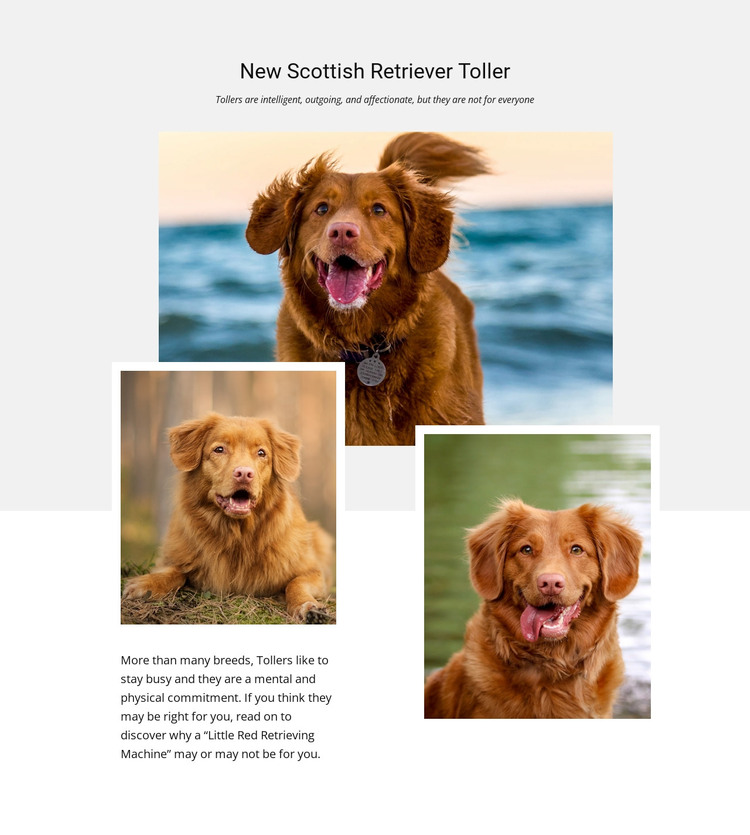
The centered heading, subtitle, and paragraph give this section the character of stable informational page content rather than a time-sensitive update. “New Scottish Retriever Toller” identifies the subject, while the subtitle describes Tollers as intelligent, outgoing, and affectionate and notes that they are not for everyone. The paragraph develops that qualification by explaining the breed’s mental and physical commitment and by using the phrase “Little Red Retrieving Machine.” Together, these text areas can support a focused breed profile within a WordPress-managed page.
The three photographs provide the section’s visual identity. One wide dog image occupies the upper position, and two smaller portrait-oriented images overlap below it. White borders separate the warm-toned photographs from the light gray background and help the collage read as a deliberate content area rather than a loose image collection. The centered introduction leads into the visual group, while the paragraph below shifts toward the left, creating a readable transition from presentation to explanation.
In a WordPress-oriented project, this block can remain a reusable section for a breed, pet, or animal-information page while surrounding content handles other subjects and page functions. Its defined text-and-image relationship makes the section easy to place alongside related content without treating it as a complete theme or website. The block supplies one publishable visual content area; the wider WordPress project provides the remaining page structure and editorial context.
Customize with Nicepage
Open this ready-made template in the WordPress Website Builder and customize it visually in the Nicepage editor. Replace demo content, edit page sections, and adapt the design to your project without rebuilding the template from scratch.
Edit Template Offline
2. Create a new page or select existing
3. Click Add new block, search for id 42655 and click enter
Edit Template Online
Create Awesome Websites


Free Nicepage Builder
Keywords
Manage and Edit This Theme in WordPress
Customize and Install the WordPress Theme
Start with this ready-made theme instead of building the WordPress design from scratch. Customize its layout, content, typography, images, sections, and other design elements visually in Nicepage editor, then export and install the WordPress Theme, Plugin, and Pages on your WordPress site. The Nicepage WordPress Plugin lets you continue working with the site after installation.
Edit the Theme Directly in WordPress
After installation, you can edit the WordPress Theme directly in WordPress with the Nicepage WordPress Plugin. Use Site Style to customize site Colors, Fonts, Header, Footer, Blog, and Post Page Templates while working within your WordPress website.
Edit WordPress Pages Visually
Use the Nicepage WordPress Plugin to edit page content directly from the WordPress admin area. Open a WordPress Page with Nicepage and visually change its text, images, sections, and other page elements while continuing to manage the Page through WordPress.
WordPress Content and Theme Integration
Use the customized theme with WordPress Pages, Posts, Blog and Post Templates, menus, widgets, and other CMS-managed content. Shared theme elements such as Colors, Fonts, Header, Footer, Blog, and Post Page Templates can be managed as part of the overall site design, while WordPress provides the CMS environment for managing site content.
This workflow combines a ready-made WordPress Theme with visual customization, direct theme editing in WordPress, and continued content management through the Nicepage WordPress Plugin.