Model profile WordPress Theme


Stable Profile Content Fits a WordPress-Managed Page Section
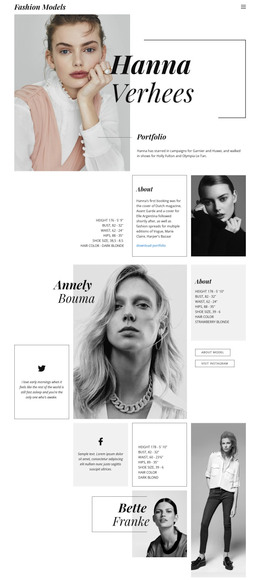
The model name, portrait, quote, measurements, hair color, and profile actions form stable page content rather than a time-based list of posts. In a WordPress-oriented project, this block can serve as a reusable profile area on a page about Annely Bouma or featured talent. The large central portrait establishes identity, while the right-side About panel makes the key details easy to locate and the left quote panel adds editorial context.
The content relationship also separates recognition from onward action. Visitors first encounter the portrait, then can read the quote and factual profile information before choosing about model or visit instagram. The Instagram action leads to an external Annely Bouma profile and opens in a new tab, so it can remain a distinct social destination within the section. Other WordPress-managed page content can surround this profile without changing its internal role.
The block therefore works as a publishable content region inside a wider WordPress site, not as a standalone theme. Its thin black borders, serif italic headings, compact sans-serif copy, and mostly white background provide a consistent visual treatment for this section. Related profiles or portfolio content may use the same direction, while the broader project determines its own page and content structure.
Customize with Nicepage
Open this ready-made template in the WordPress Website Builder and customize it visually in the Nicepage editor. Replace demo content, edit page sections, and adapt the design to your project without rebuilding the template from scratch.
Edit Template Offline
2. Create a new page or select existing
3. Click Add new block, search for id 41387 and click enter
Edit Template Online
Create Awesome Websites


Free Nicepage Builder
Keywords
Manage and Edit This Theme in WordPress
Customize and Install the WordPress Theme
Start with this ready-made theme instead of building the WordPress design from scratch. Customize its layout, content, typography, images, sections, and other design elements visually in Nicepage editor, then export and install the WordPress Theme, Plugin, and Pages on your WordPress site. The Nicepage WordPress Plugin lets you continue working with the site after installation.
Edit the Theme Directly in WordPress
After installation, you can edit the WordPress Theme directly in WordPress with the Nicepage WordPress Plugin. Use Site Style to customize site Colors, Fonts, Header, Footer, Blog, and Post Page Templates while working within your WordPress website.
Edit WordPress Pages Visually
Use the Nicepage WordPress Plugin to edit page content directly from the WordPress admin area. Open a WordPress Page with Nicepage and visually change its text, images, sections, and other page elements while continuing to manage the Page through WordPress.
WordPress Content and Theme Integration
Use the customized theme with WordPress Pages, Posts, Blog and Post Templates, menus, widgets, and other CMS-managed content. Shared theme elements such as Colors, Fonts, Header, Footer, Blog, and Post Page Templates can be managed as part of the overall site design, while WordPress provides the CMS environment for managing site content.
This workflow combines a ready-made WordPress Theme with visual customization, direct theme editing in WordPress, and continued content management through the Nicepage WordPress Plugin.