
Offering creative services WordPress Theme


Edit Template Offline
2. Create new page and search for id 38787
Edit Template Online
Create Awesome Websites


Free Nicepage Builder
Keywords
Service Pages and Visual Work Can Share One Agency Theme
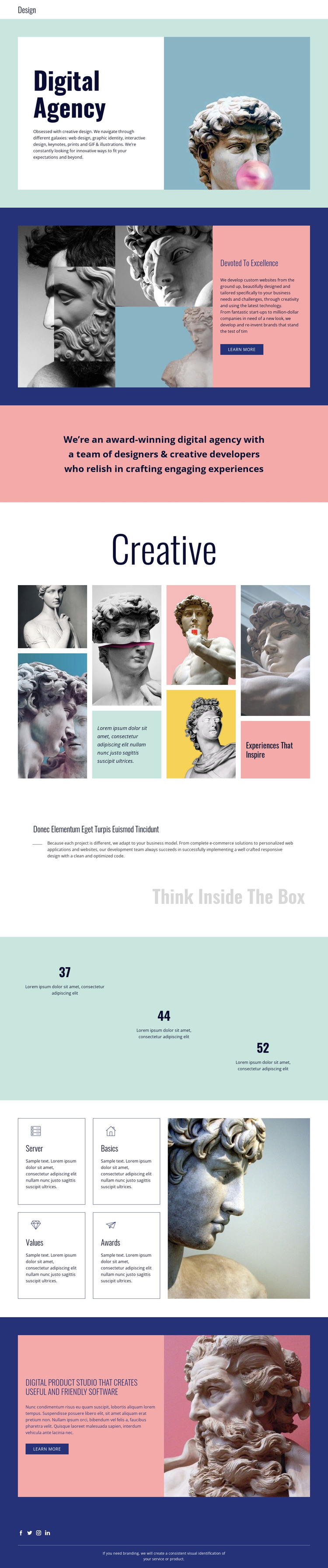
The service-oriented content gives this design a clear page-based foundation for a WordPress-managed agency site. The Digital Agency introduction can represent permanent overview content, while the Devoted to Excellence section focuses attention on custom website work and its accompanying learn more link. The listed offerings—web design, graphic identity, interactive design, keynotes, prints, GIFs, and illustrations—provide distinct subject areas that could be developed into separate editorial or service pages without changing the visual direction.
The Creative gallery has a different role from those explanatory sections. It presents sculpture imagery and colored text accents as a visual work area, making it suitable for project or portfolio content that can grow independently from the main agency description. The Think Inside The Box section adds a development perspective, while the four capability cards group supporting themes into concise reusable content units. The three numeric values are structural placeholders, so they should be replaced or verified before being presented as agency evidence.
Shared navigation, the responsive off-canvas menu, and the footer’s Facebook, Twitter, Instagram, and LinkedIn links give the design a consistent site shell around these content areas. In a WordPress project, permanent page content and future agency updates could remain within that same visual system. The template analysis does not verify existing posts or blog structures, so no such elements are claimed here.
Customize with Nicepage
Open this ready-made template in the WordPress Website Builder and customize it visually in the Nicepage editor. Replace demo content, edit page sections, and adapt the design to your project without rebuilding the template from scratch.
Manage and Edit This Theme in WordPress
Customize and Install the WordPress Theme
Start with this ready-made theme instead of building the WordPress design from scratch. Customize its layout, content, typography, images, sections, and other design elements visually in Nicepage editor, then export and install the WordPress Theme, Plugin, and Pages on your WordPress site. The Nicepage WordPress Plugin lets you continue working with the site after installation.
Edit the Theme Directly in WordPress
After installation, you can edit the WordPress Theme directly in WordPress with the Nicepage WordPress Plugin. Use Site Style to customize site Colors, Fonts, Header, Footer, Blog, and Post Page Templates while working within your WordPress website.
Edit WordPress Pages Visually
Use the Nicepage WordPress Plugin to edit page content directly from the WordPress admin area. Open a WordPress Page with Nicepage and visually change its text, images, sections, and other page elements while continuing to manage the Page through WordPress.
WordPress Content and Theme Integration
Use the customized theme with WordPress Pages, Posts, Blog and Post Templates, menus, widgets, and other CMS-managed content. Shared theme elements such as Colors, Fonts, Header, Footer, Blog, and Post Page Templates can be managed as part of the overall site design, while WordPress provides the CMS environment for managing site content.
This workflow combines a ready-made WordPress Theme with visual customization, direct theme editing in WordPress, and continued content management through the Nicepage WordPress Plugin.





















