Call Center Help WordPress Theme


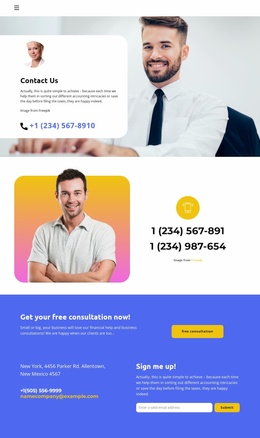
The portrait and phone link turn service information into stable page content
The circular portrait introduces the white card before visitors reach the statement about dropping off a vehicle 24/7. That sequence gives the section a human focal point, then presents the service-access message and a visible phone contact link within the same bounded surface. The full-width photographic background adds business context behind the card, while the rounded white shape and dark text preserve readability. Because the block is static, its content can be understood immediately without relying on expandable panels, slides, or other interaction.
For a WordPress-oriented project, this arrangement fits naturally as stable content on a services, contact, or service-information page. The 24/7 drop-off statement communicates an ongoing convenience rather than a time-sensitive article, and the phone link provides a direct channel for visitors who need more information. The image credit remains a supporting part of the section, while the portrait and message carry the visual and informational focus. This makes the block more suitable for a permanent page area than for a stream of dated editorial entries.
The section can retain its visual identity within a wider WordPress-managed site while surrounding content expands around it. Other page areas may explain procedures or list additional services, but this block can remain the concise access message and contact point. Its rounded card, blue phone emphasis, and layered image relationship provide a recognizable presentation without implying that the block itself is a complete theme or site.
Customize with Nicepage
Open this ready-made template in the WordPress Website Builder and customize it visually in the Nicepage editor. Replace demo content, edit page sections, and adapt the design to your project without rebuilding the template from scratch.
Edit Template Offline
2. Create a new page or select existing
3. Click Add new block, search for id 3493864 and click enter
Edit Template Online
Create Awesome Websites


Free Nicepage Builder
Keywords
Manage and Edit This Theme in WordPress
Customize and Install the WordPress Theme
Start with this ready-made theme instead of building the WordPress design from scratch. Customize its layout, content, typography, images, sections, and other design elements visually in Nicepage editor, then export and install the WordPress Theme, Plugin, and Pages on your WordPress site. The Nicepage WordPress Plugin lets you continue working with the site after installation.
Edit the Theme Directly in WordPress
After installation, you can edit the WordPress Theme directly in WordPress with the Nicepage WordPress Plugin. Use Site Style to customize site Colors, Fonts, Header, Footer, Blog, and Post Page Templates while working within your WordPress website.
Edit WordPress Pages Visually
Use the Nicepage WordPress Plugin to edit page content directly from the WordPress admin area. Open a WordPress Page with Nicepage and visually change its text, images, sections, and other page elements while continuing to manage the Page through WordPress.
WordPress Content and Theme Integration
Use the customized theme with WordPress Pages, Posts, Blog and Post Templates, menus, widgets, and other CMS-managed content. Shared theme elements such as Colors, Fonts, Header, Footer, Blog, and Post Page Templates can be managed as part of the overall site design, while WordPress provides the CMS environment for managing site content.
This workflow combines a ready-made WordPress Theme with visual customization, direct theme editing in WordPress, and continued content management through the Nicepage WordPress Plugin.