Two payment programs WordPress Theme


Plan details form stable page content for WordPress
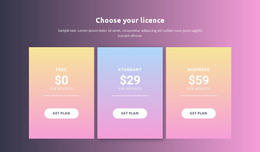
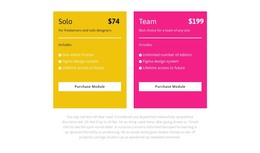
The section reads as durable pricing content rather than a stream of dated editorial entries. Its two cards organize the information into the Solo and Team plan areas, making it suitable for a stable services, product, or licensing page within a WordPress-managed site. Solo presents a displayed $74 price and one editor license; Team presents $199 and unlimited editors. Both retain the Figma design-system and lifetime-access details, so the content model combines shared information with plan-specific distinctions.
The visual treatment keeps that content consistent as one page region. Yellow and pink backgrounds separate the alternatives, dark text supports scanning, white dividers structure the included-feature lists, and each Purchase Module action occupies a repeated white area. The supporting paragraph below can remain a separate explanatory text region, allowing the cards to retain their comparison function if surrounding page content changes.
In a WordPress-oriented project, this block can serve as permanent page content while the broader site manages other pages and publishing needs around it. The section does not depend on inventing blog posts, categories, or widgets inside the cards. Its useful CMS role comes from the clear, reusable pricing information and the visual pattern that keeps the two plan areas consistent within a managed page.
Customize with Nicepage
Open this ready-made template in the WordPress Website Builder and customize it visually in the Nicepage editor. Replace demo content, edit page sections, and adapt the design to your project without rebuilding the template from scratch.
Edit Template Offline
2. Create a new page or select existing
3. Click Add new block, search for id 3022336 and click enter
Edit Template Online
Create Awesome Websites


Free Nicepage Builder
Keywords
Manage and Edit This Theme in WordPress
Customize and Install the WordPress Theme
Start with this ready-made theme instead of building the WordPress design from scratch. Customize its layout, content, typography, images, sections, and other design elements visually in Nicepage editor, then export and install the WordPress Theme, Plugin, and Pages on your WordPress site. The Nicepage WordPress Plugin lets you continue working with the site after installation.
Edit the Theme Directly in WordPress
After installation, you can edit the WordPress Theme directly in WordPress with the Nicepage WordPress Plugin. Use Site Style to customize site Colors, Fonts, Header, Footer, Blog, and Post Page Templates while working within your WordPress website.
Edit WordPress Pages Visually
Use the Nicepage WordPress Plugin to edit page content directly from the WordPress admin area. Open a WordPress Page with Nicepage and visually change its text, images, sections, and other page elements while continuing to manage the Page through WordPress.
WordPress Content and Theme Integration
Use the customized theme with WordPress Pages, Posts, Blog and Post Templates, menus, widgets, and other CMS-managed content. Shared theme elements such as Colors, Fonts, Header, Footer, Blog, and Post Page Templates can be managed as part of the overall site design, while WordPress provides the CMS environment for managing site content.
This workflow combines a ready-made WordPress Theme with visual customization, direct theme editing in WordPress, and continued content management through the Nicepage WordPress Plugin.