Our pricing WordPress Theme


Stable Plan Content Fits a WordPress-Managed Offering Page
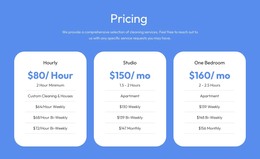
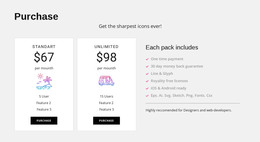
The three plan panels read as stable page content because they organize a defined comparison rather than a stream of dated editorial entries. Each panel keeps the same internal sequence: plan name, displayed price, multiline feature list, and purchase button. That consistency makes the section suitable for a WordPress-managed page where the pricing area needs to remain visually coherent while surrounding site content develops separately.
The visual hierarchy also supports page-level reuse. Light panels with subtle shadows divide the choices, and centered typography makes equivalent plan details easy to compare. The middle panel's gray gradient and blue purchase button identify a preferred or emphasized option, while the outer gray buttons preserve alternative choices. The blue background band gives the pricing region a distinct boundary that can help it sit between explanatory sections without requiring a separate layout system.
In a WordPress-oriented project, the block can function as a permanent pricing section inside a broader page composition. The displayed values and feature lines can be replaced or maintained according to the site's content needs, while the established panel structure preserves the comparison. The block contributes the visual presentation of plans and purchase links; the surrounding WordPress-managed page provides the wider context, supporting copy, and related content around that section.
Customize with Nicepage
Open this ready-made template in the WordPress Website Builder and customize it visually in the Nicepage editor. Replace demo content, edit page sections, and adapt the design to your project without rebuilding the template from scratch.
Edit Template Offline
2. Create a new page or select existing
3. Click Add new block, search for id 92933 and click enter
Edit Template Online
Create Awesome Websites


Free Nicepage Builder
Keywords
Manage and Edit This Theme in WordPress
Customize and Install the WordPress Theme
Start with this ready-made theme instead of building the WordPress design from scratch. Customize its layout, content, typography, images, sections, and other design elements visually in Nicepage editor, then export and install the WordPress Theme, Plugin, and Pages on your WordPress site. The Nicepage WordPress Plugin lets you continue working with the site after installation.
Edit the Theme Directly in WordPress
After installation, you can edit the WordPress Theme directly in WordPress with the Nicepage WordPress Plugin. Use Site Style to customize site Colors, Fonts, Header, Footer, Blog, and Post Page Templates while working within your WordPress website.
Edit WordPress Pages Visually
Use the Nicepage WordPress Plugin to edit page content directly from the WordPress admin area. Open a WordPress Page with Nicepage and visually change its text, images, sections, and other page elements while continuing to manage the Page through WordPress.
WordPress Content and Theme Integration
Use the customized theme with WordPress Pages, Posts, Blog and Post Templates, menus, widgets, and other CMS-managed content. Shared theme elements such as Colors, Fonts, Header, Footer, Blog, and Post Page Templates can be managed as part of the overall site design, while WordPress provides the CMS environment for managing site content.
This workflow combines a ready-made WordPress Theme with visual customization, direct theme editing in WordPress, and continued content management through the Nicepage WordPress Plugin.