Testimonials in slider WordPress Theme


Image-Backed Testimonial Content for a WordPress Page Area
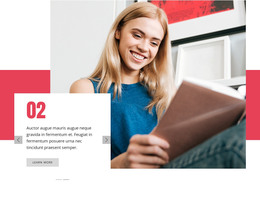
The repeated slide structure makes this block well suited to stable page content in a WordPress-managed site. Each testimonial item follows the same pattern: portrait-oriented imagery establishes the human context, the quote carries the statement, and the person name with role label identifies the speaker. This is a page-oriented content region rather than a changing list of unrelated elements, so it can remain visually consistent while the surrounding site develops other pages and content areas.
The carousel keeps two statements available within one compact section. Previous and next controls allow visitors to change the visible testimonial, and the two indicators make the sequence legible without adding a separate card grid. Dark imagery and white overlay text keep the proof area visually concentrated, while orange square controls give the interaction a clear local accent. In a WordPress-oriented project, the block can therefore support a permanent testimonials area on a page, with the broader CMS handling other site content around it. The key contribution is its stable, reusable presentation of image-backed testimonial records, not an assumption about posts, categories, or other publishing structures.
Customize with Nicepage
Open this ready-made template in the WordPress Website Builder and customize it visually in the Nicepage editor. Replace demo content, edit page sections, and adapt the design to your project without rebuilding the template from scratch.
Edit Template Offline
2. Create a new page or select existing
3. Click Add new block, search for id 1790243 and click enter
Edit Template Online
Create Awesome Websites


Free Nicepage Builder
Keywords
Manage and Edit This Theme in WordPress
Customize and Install the WordPress Theme
Start with this ready-made theme instead of building the WordPress design from scratch. Customize its layout, content, typography, images, sections, and other design elements visually in Nicepage editor, then export and install the WordPress Theme, Plugin, and Pages on your WordPress site. The Nicepage WordPress Plugin lets you continue working with the site after installation.
Edit the Theme Directly in WordPress
After installation, you can edit the WordPress Theme directly in WordPress with the Nicepage WordPress Plugin. Use Site Style to customize site Colors, Fonts, Header, Footer, Blog, and Post Page Templates while working within your WordPress website.
Edit WordPress Pages Visually
Use the Nicepage WordPress Plugin to edit page content directly from the WordPress admin area. Open a WordPress Page with Nicepage and visually change its text, images, sections, and other page elements while continuing to manage the Page through WordPress.
WordPress Content and Theme Integration
Use the customized theme with WordPress Pages, Posts, Blog and Post Templates, menus, widgets, and other CMS-managed content. Shared theme elements such as Colors, Fonts, Header, Footer, Blog, and Post Page Templates can be managed as part of the overall site design, while WordPress provides the CMS environment for managing site content.
This workflow combines a ready-made WordPress Theme with visual customization, direct theme editing in WordPress, and continued content management through the Nicepage WordPress Plugin.