
We are creative business WordPress Theme


Edit Template Offline
2. Create new page and search for id 16860
Edit Template Online
Create Awesome Websites


Free Nicepage Builder
Keywords
Portfolio stories and service content within a WordPress theme direction
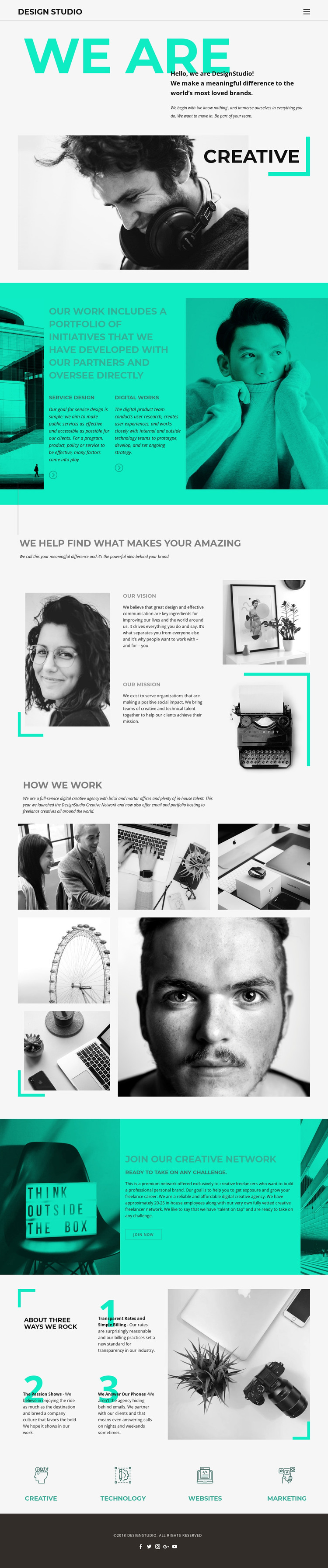
The page-oriented content gives this design a natural WordPress theme interpretation centered on permanent agency information. The opening studio statement and the Service Design and Digital Works section can serve as core page content, while the separate vision and mission area adds editorial context about how the organization presents itself. These parts have different roles, so they can remain distinct when the site’s content is maintained and expanded.
The seven-image collage in “How We Work” is especially useful as a visual content area alongside explanatory text. It brings editorial, product, and portrait imagery into the same narrative as the service categories, creating a place for project examples or visual updates without claiming that posts or a blog already exist in the template. The three numbered principles add another repeatable content pattern for communicating the studio’s methods and values.
The Creative Network section gives the theme a second content direction beyond client-facing services. Its invitation and “Join now” action can support a community or recruitment-oriented page area, while the Creative, Technology, Websites, and Marketing labels provide a compact summary of the agency’s scope. Five social destinations complete the shared identity treatment. These relationships allow the design to surround WordPress-managed page content with a consistent visual system while preserving the distinction between services, editorial explanation, imagery, principles, and network participation.
Customize with Nicepage
Open this ready-made template in the WordPress Website Builder and customize it visually in the Nicepage editor. Replace demo content, edit page sections, and adapt the design to your project without rebuilding the template from scratch.
Manage and Edit This Theme in WordPress
Customize and Install the WordPress Theme
Start with this ready-made theme instead of building the WordPress design from scratch. Customize its layout, content, typography, images, sections, and other design elements visually in Nicepage editor, then export and install the WordPress Theme, Plugin, and Pages on your WordPress site. The Nicepage WordPress Plugin lets you continue working with the site after installation.
Edit the Theme Directly in WordPress
After installation, you can edit the WordPress Theme directly in WordPress with the Nicepage WordPress Plugin. Use Site Style to customize site Colors, Fonts, Header, Footer, Blog, and Post Page Templates while working within your WordPress website.
Edit WordPress Pages Visually
Use the Nicepage WordPress Plugin to edit page content directly from the WordPress admin area. Open a WordPress Page with Nicepage and visually change its text, images, sections, and other page elements while continuing to manage the Page through WordPress.
WordPress Content and Theme Integration
Use the customized theme with WordPress Pages, Posts, Blog and Post Templates, menus, widgets, and other CMS-managed content. Shared theme elements such as Colors, Fonts, Header, Footer, Blog, and Post Page Templates can be managed as part of the overall site design, while WordPress provides the CMS environment for managing site content.
This workflow combines a ready-made WordPress Theme with visual customization, direct theme editing in WordPress, and continued content management through the Nicepage WordPress Plugin.





















