
Fashion Trends WordPress Theme


Edit Template Offline
2. Create new page and search for id 12905
Edit Template Online
Create Awesome Websites


Free Nicepage Builder
Keywords
Editorial Topics Give WordPress Content Areas a Coherent Visual Context
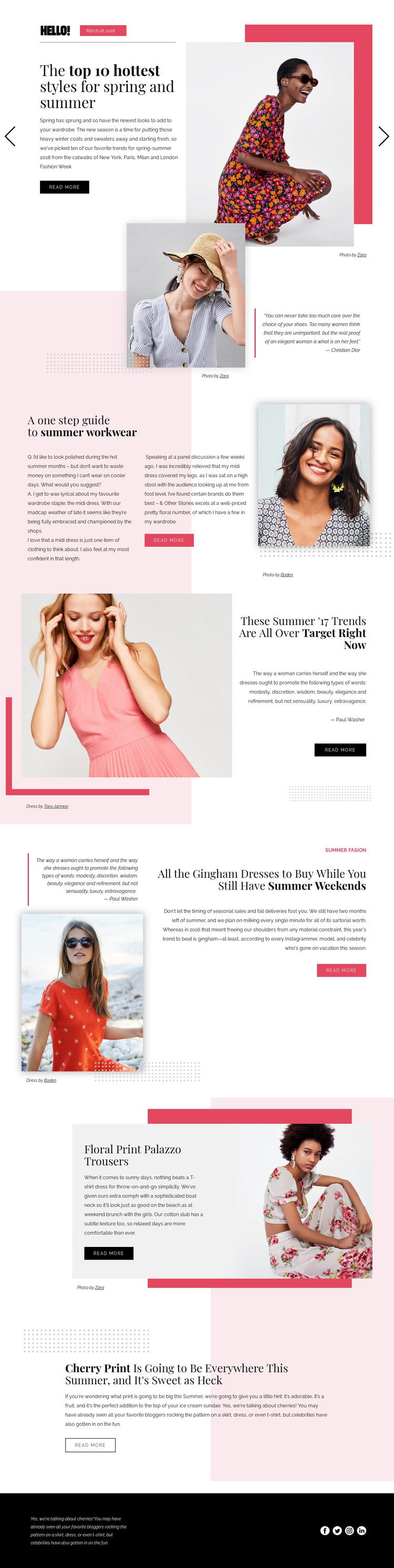
The page separates permanent editorial subjects into clear content areas that could be interpreted within a WordPress-managed fashion site. The spring-and-summer slider works as a featured entry point, while the workwear guide, Target trend, gingham dresses, floral print trousers, and cherry print sections provide distinct page-oriented topics. Their shared treatment of headings, images, descriptions, credits, and read-more actions creates a visual relationship that can continue around related content.
The design is especially suited to a project where fashion coverage needs both strong imagery and recognizable editorial categories. The portrait quotation section can support contextual or opinion-led material, while the image-only section offers a visual break between denser stories. The footer's four social sharing links define a shared site area that can remain separate from the main article content. These observations describe how the design's areas may fit a WordPress content environment; they do not claim that WordPress Posts, categories, or blog templates already exist in the template.
A WordPress-oriented implementation could therefore preserve the page's magazine character while organizing fashion stories around their subjects and recurring visual patterns. The benefit is not simply adding a CMS label. It is the ability to relate featured coverage, focused trend topics, supporting quotations, and social destinations through one consistent visual direction, while keeping the sample names, date, and credits as template content rather than verified publication facts.
Customize with Nicepage
Open this ready-made template in the WordPress Website Builder and customize it visually in the Nicepage editor. Replace demo content, edit page sections, and adapt the design to your project without rebuilding the template from scratch.
Manage and Edit This Theme in WordPress
Customize and Install the WordPress Theme
Start with this ready-made theme instead of building the WordPress design from scratch. Customize its layout, content, typography, images, sections, and other design elements visually in Nicepage editor, then export and install the WordPress Theme, Plugin, and Pages on your WordPress site. The Nicepage WordPress Plugin lets you continue working with the site after installation.
Edit the Theme Directly in WordPress
After installation, you can edit the WordPress Theme directly in WordPress with the Nicepage WordPress Plugin. Use Site Style to customize site Colors, Fonts, Header, Footer, Blog, and Post Page Templates while working within your WordPress website.
Edit WordPress Pages Visually
Use the Nicepage WordPress Plugin to edit page content directly from the WordPress admin area. Open a WordPress Page with Nicepage and visually change its text, images, sections, and other page elements while continuing to manage the Page through WordPress.
WordPress Content and Theme Integration
Use the customized theme with WordPress Pages, Posts, Blog and Post Templates, menus, widgets, and other CMS-managed content. Shared theme elements such as Colors, Fonts, Header, Footer, Blog, and Post Page Templates can be managed as part of the overall site design, while WordPress provides the CMS environment for managing site content.
This workflow combines a ready-made WordPress Theme with visual customization, direct theme editing in WordPress, and continued content management through the Nicepage WordPress Plugin.





















