
Summer time collection WordPress Theme


Edit Template Offline
2. Create new page and search for id 12397
Edit Template Online
Create Awesome Websites


Free Nicepage Builder
Keywords
Editorial Stories and Collection Cards Map Naturally to WordPress Content
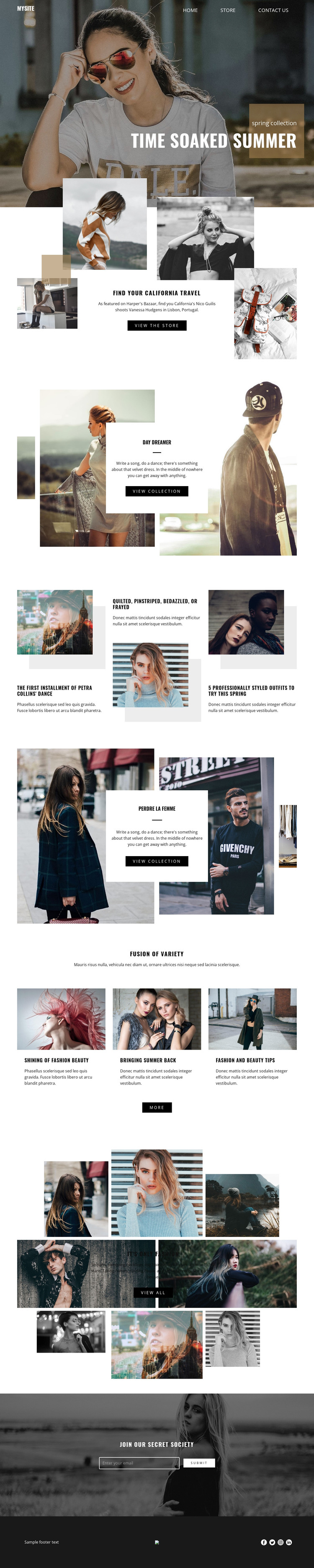
The collection features give this design clear page-oriented content areas for a WordPress fashion project. Day Dreamer and PERDRE LA FEMME each combine a collection title, descriptive text, large supporting images, and a view-collection action. Those sections can represent permanent pages or campaign destinations while retaining the centered-card and image-framing relationship established by the design. Find Your California Travel adds a separate store-oriented path, giving the site another content area with a distinct commercial role.
The three editorial story columns provide a different publishing rhythm. Their repeated image-and-copy structure can accommodate fashion features, styling material, or other editorial subjects without changing the visual language of the page. Fusion of variety extends that pattern through three fashion and beauty category cards, while the It’s Only Fashion gallery supplies a more image-led presentation for visual content. These areas can be interpreted together as a blend of page content and regularly refreshed editorial material, without claiming that specific WordPress posts or categories already exist.
Join Our Secret Society contributes a focused email subscription region, and the navigation, social links, and dark footer establish shared site elements around the content. A WordPress implementation can therefore organize collection pages, editorial material, store access, and audience communication around one consistent theme direction. The design is especially suited to a project that needs both permanent fashion presentation and room for ongoing content updates.
Customize with Nicepage
Open this ready-made template in the WordPress Website Builder and customize it visually in the Nicepage editor. Replace demo content, edit page sections, and adapt the design to your project without rebuilding the template from scratch.
Manage and Edit This Theme in WordPress
Customize and Install the WordPress Theme
Start with this ready-made theme instead of building the WordPress design from scratch. Customize its layout, content, typography, images, sections, and other design elements visually in Nicepage editor, then export and install the WordPress Theme, Plugin, and Pages on your WordPress site. The Nicepage WordPress Plugin lets you continue working with the site after installation.
Edit the Theme Directly in WordPress
After installation, you can edit the WordPress Theme directly in WordPress with the Nicepage WordPress Plugin. Use Site Style to customize site Colors, Fonts, Header, Footer, Blog, and Post Page Templates while working within your WordPress website.
Edit WordPress Pages Visually
Use the Nicepage WordPress Plugin to edit page content directly from the WordPress admin area. Open a WordPress Page with Nicepage and visually change its text, images, sections, and other page elements while continuing to manage the Page through WordPress.
WordPress Content and Theme Integration
Use the customized theme with WordPress Pages, Posts, Blog and Post Templates, menus, widgets, and other CMS-managed content. Shared theme elements such as Colors, Fonts, Header, Footer, Blog, and Post Page Templates can be managed as part of the overall site design, while WordPress provides the CMS environment for managing site content.
This workflow combines a ready-made WordPress Theme with visual customization, direct theme editing in WordPress, and continued content management through the Nicepage WordPress Plugin.





















