
The largest management consultancy WordPress Theme


Edit Template Offline
2. Create new page and search for id 12108
Edit Template Online
Create Awesome Websites


Free Nicepage Builder
Keywords
Service Cards and Founder Content Map Naturally to WordPress Pages
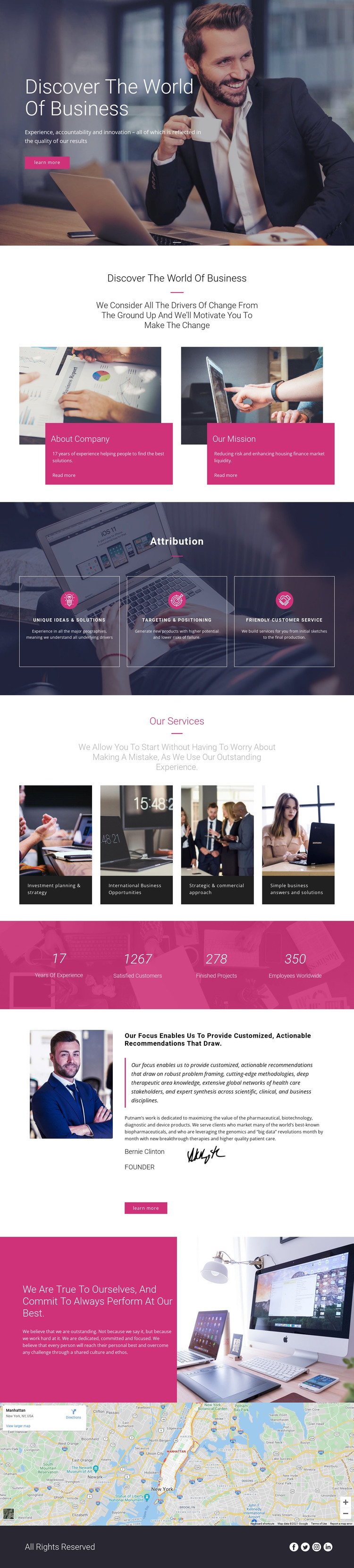
The four service cards provide the strongest page-oriented content structure in this design. Investment planning and strategy, international business opportunities, strategic and commercial consulting, and simple business answers and solutions are presented as separate categories, making them easier to interpret as distinct areas of managed business content rather than one general description. The three capability panels add supporting information about ideas, positioning, and customer service.
The About Company and Our Mission cards can serve as permanent organizational content, while the founder profile creates another page-oriented region built around a portrait, advisory statement, and Learn more action. This division gives a WordPress-managed project a clear relationship between company information, service material, leadership content, and values. The metric band can remain a visual proof section, but its sample figures should be replaced or verified before being treated as business claims.
The map near the bottom supplies location context, and the footer’s Facebook, Twitter, Instagram, and LinkedIn links connect shared site elements with the main page content. The theme’s dark photographic backgrounds and magenta accents keep these areas visually related. If the project later adds regularly updated editorial material, it can be placed around this established page structure without changing the central consulting presentation, while the existing design remains focused on permanent service and company content.
Customize with Nicepage
Open this ready-made template in the WordPress Website Builder and customize it visually in the Nicepage editor. Replace demo content, edit page sections, and adapt the design to your project without rebuilding the template from scratch.
Manage and Edit This Theme in WordPress
Customize and Install the WordPress Theme
Start with this ready-made theme instead of building the WordPress design from scratch. Customize its layout, content, typography, images, sections, and other design elements visually in Nicepage editor, then export and install the WordPress Theme, Plugin, and Pages on your WordPress site. The Nicepage WordPress Plugin lets you continue working with the site after installation.
Edit the Theme Directly in WordPress
After installation, you can edit the WordPress Theme directly in WordPress with the Nicepage WordPress Plugin. Use Site Style to customize site Colors, Fonts, Header, Footer, Blog, and Post Page Templates while working within your WordPress website.
Edit WordPress Pages Visually
Use the Nicepage WordPress Plugin to edit page content directly from the WordPress admin area. Open a WordPress Page with Nicepage and visually change its text, images, sections, and other page elements while continuing to manage the Page through WordPress.
WordPress Content and Theme Integration
Use the customized theme with WordPress Pages, Posts, Blog and Post Templates, menus, widgets, and other CMS-managed content. Shared theme elements such as Colors, Fonts, Header, Footer, Blog, and Post Page Templates can be managed as part of the overall site design, while WordPress provides the CMS environment for managing site content.
This workflow combines a ready-made WordPress Theme with visual customization, direct theme editing in WordPress, and continued content management through the Nicepage WordPress Plugin.





















