About beauty creators WordPress Theme


A Recognizable About Area for WordPress Page Content
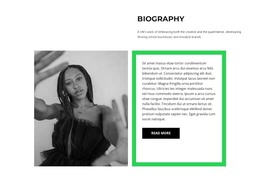
The left column gives the block its publishable message: an “about me” heading, supporting paragraph, and “learn more” action arranged as one concise introduction. The right column performs a different content task by pairing a circular portrait with a person name label inside a saturated yellow panel. Together, these areas create a personal profile moment without turning the section into a complete biography, portfolio, or standalone site structure.
Within WordPress-managed page content, the block can serve as a stable about area for a creator or individual whose identity needs to be introduced alongside other sections. The content relationship is straightforward and reusable: explanation appears first, visual recognition balances it, and the action provides a possible route to further details. The static interaction keeps the emphasis on readable content and the connection between the person’s description and portrait.
Its visual system supports that page role. The light gray field leaves space around the split, the black heading panel gives the introduction a strong entry point, and the yellow portrait panel creates a memorable color anchor. The black-and-white image avoids competing with that accent while remaining visually distinct. In a wider WordPress project, other page sections can contain work samples, services, or contact information; this block can remain the focused personal introduction that connects those areas to a recognizable person.
Customize with Nicepage
Open this ready-made template in the WordPress Website Builder and customize it visually in the Nicepage editor. Replace demo content, edit page sections, and adapt the design to your project without rebuilding the template from scratch.
Edit Template Offline
2. Create a new page or select existing
3. Click Add new block, search for id 1021759 and click enter
Edit Template Online
Create Awesome Websites


Free Nicepage Builder
Keywords
Manage and Edit This Theme in WordPress
Customize and Install the WordPress Theme
Start with this ready-made theme instead of building the WordPress design from scratch. Customize its layout, content, typography, images, sections, and other design elements visually in Nicepage editor, then export and install the WordPress Theme, Plugin, and Pages on your WordPress site. The Nicepage WordPress Plugin lets you continue working with the site after installation.
Edit the Theme Directly in WordPress
After installation, you can edit the WordPress Theme directly in WordPress with the Nicepage WordPress Plugin. Use Site Style to customize site Colors, Fonts, Header, Footer, Blog, and Post Page Templates while working within your WordPress website.
Edit WordPress Pages Visually
Use the Nicepage WordPress Plugin to edit page content directly from the WordPress admin area. Open a WordPress Page with Nicepage and visually change its text, images, sections, and other page elements while continuing to manage the Page through WordPress.
WordPress Content and Theme Integration
Use the customized theme with WordPress Pages, Posts, Blog and Post Templates, menus, widgets, and other CMS-managed content. Shared theme elements such as Colors, Fonts, Header, Footer, Blog, and Post Page Templates can be managed as part of the overall site design, while WordPress provides the CMS environment for managing site content.
This workflow combines a ready-made WordPress Theme with visual customization, direct theme editing in WordPress, and continued content management through the Nicepage WordPress Plugin.