
Sunglasses WordPress Theme
Edit Template Offline
2. Create new page and search for id 13030
Edit Template Online
Create Awesome Websites


Free Nicepage Builder
Keywords
Collection Items and Brand Stories Suit WordPress Content Areas
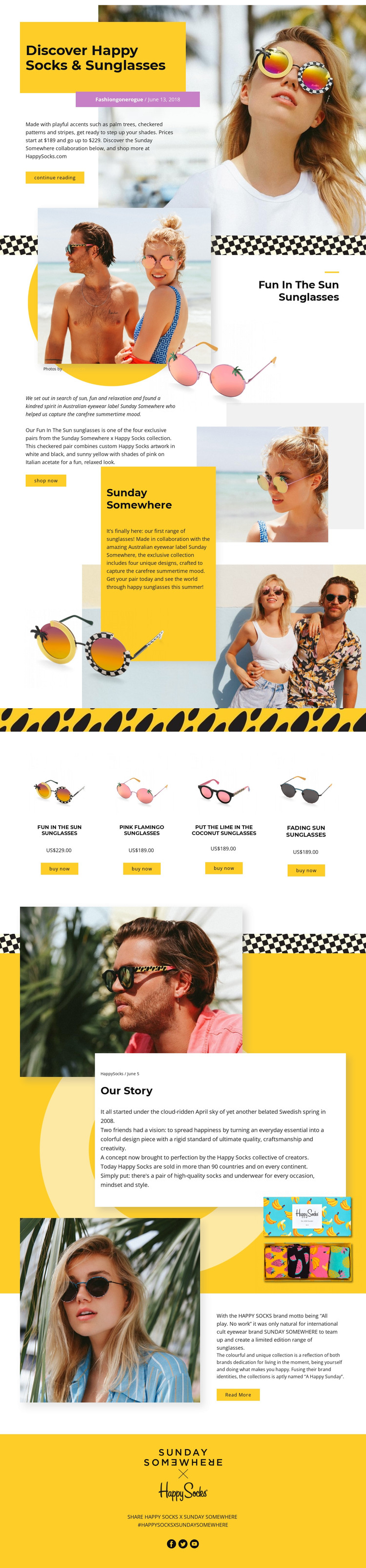
The design divides its subject into durable page content and repeated collection content. The opening hero introduces the collaboration through a portrait, title panel, description, and continue reading action, while the “Fun in The Sun Sunglasses” feature gives the collection a strong editorial product story. These areas work together as permanent presentation content: one explains the subject, and the other gives a featured design a prominent visual and commercial role.
The repeated product section offers a separate content relationship. Four named designs—Fun In The Sun, Pink Flamingo, Put The Lime In The Coconut, and Fading Sun—are presented with product imagery, prices, and buy now actions. Their shared arrangement makes the collection easy to compare while allowing each item to remain distinct. The displayed US$189.00 and US$229.00 values add visible product context, but they should be treated as the sample values shown in this design rather than as a verified current catalog.
The Sunday Somewhere About Us panel, Our Story section, and second collaboration feature provide page-oriented brand content around the product group. Continue reading and read more actions can connect that editorial material to additional content when the project grows, while the final block groups Facebook, Twitter, and YouTube links as a social destination. In a WordPress-managed environment, the important mapping is therefore between collection items, permanent brand pages, navigation actions, and shared visual presentation—not an unsupported claim that blog posts or WordPress content already exist.
Customize with Nicepage
Open this ready-made template in the WordPress Website Builder and customize it visually in the Nicepage editor. Replace demo content, edit page sections, and adapt the design to your project without rebuilding the template from scratch.
Manage and Edit This Theme in WordPress
Customize and Install the WordPress Theme
Start with this ready-made theme instead of building the WordPress design from scratch. Customize its layout, content, typography, images, sections, and other design elements visually in Nicepage editor, then export and install the WordPress Theme, Plugin, and Pages on your WordPress site. The Nicepage WordPress Plugin lets you continue working with the site after installation.
Edit the Theme Directly in WordPress
After installation, you can edit the WordPress Theme directly in WordPress with the Nicepage WordPress Plugin. Use Site Style to customize site Colors, Fonts, Header, Footer, Blog, and Post Page Templates while working within your WordPress website.
Edit WordPress Pages Visually
Use the Nicepage WordPress Plugin to edit page content directly from the WordPress admin area. Open a WordPress Page with Nicepage and visually change its text, images, sections, and other page elements while continuing to manage the Page through WordPress.
WordPress Content and Theme Integration
Use the customized theme with WordPress Pages, Posts, Blog and Post Templates, menus, widgets, and other CMS-managed content. Shared theme elements such as Colors, Fonts, Header, Footer, Blog, and Post Page Templates can be managed as part of the overall site design, while WordPress provides the CMS environment for managing site content.
This workflow combines a ready-made WordPress Theme with visual customization, direct theme editing in WordPress, and continued content management through the Nicepage WordPress Plugin.





















