Creative Summit Event Template


Edit Template Offline
2. Create new page and search for id 6626618
Edit Template Online
Create Awesome Websites


Free Nicepage Builder
Keywords
Three Design Themes Give the Summit a Distinctive Starting Point
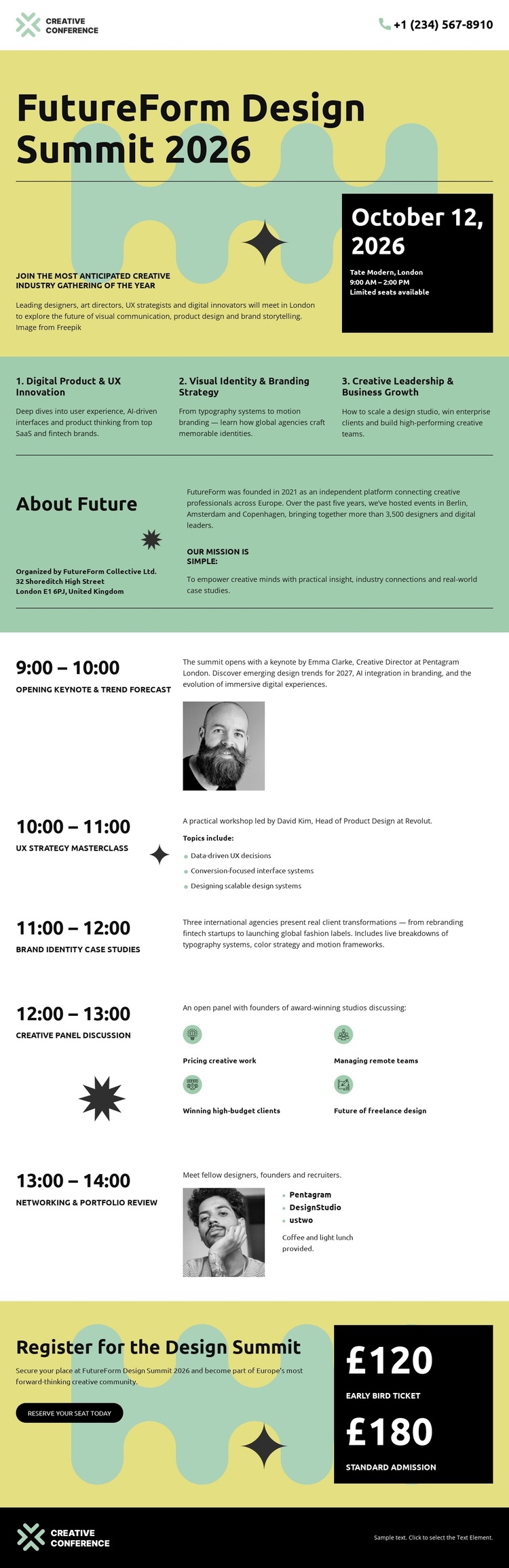
The three adjacent topic areas make this design easy to distinguish from event layouts built around a single announcement or a generic schedule. Digital Product & Innovation, Visual Identity & Branding, and Creative Leadership & Business Growth give the summit a balanced content scope, allowing visitors to see how product thinking, visual communication, and leadership belong to the same conference. Their repeated horizontal arrangement also gives the page a recognizable organizing idea.
That subject structure is supported by the opening composition. Future Form Design Summit 2026 appears beside a contrasting date and venue panel, so the design communicates both creative identity and practical event information without relying on a long introduction. The About Summit section adds context, while the chronological agenda develops the promise through an opening keynote, UX strategy masterclass, brand identity case studies, creative pixel discussion, and networking and portfolio review. Selected speaker portraits add a human visual layer to the schedule.
The registration section completes the choice with two clearly presented ticket levels: £120 early bird and £180 standard admission. This combination of focused themes, program depth, strong editorial styling, and visible registration information makes the template a useful option for a design summit or comparable creative event. Its value comes from how these parts work together, rather than from a generic claim that any event template can be customized.
Customize with Nicepage
Open this ready-made template in the Template Builder and customize it visually in the Nicepage editor. Replace demo content, edit page sections, and adapt the design to your project without rebuilding the template from scratch.
Start With a Ready-Made Template
Choose a Design for a New Page
Use a ready-made template as a starting point instead of creating every page from a blank canvas. When adding a new page in Nicepage, browse available designs, compare different layouts, and choose an option that already fits the general purpose and visual direction of your project.
Browse Different Page Designs
Explore Page Designs using search, thematic categories, Design Sets, and full-page previews. The collection includes layouts for different subjects and page purposes, making it easier to compare alternatives before selecting a design to customize.
Customize the Selected Template
After choosing a design, create the page and continue editing it visually in Nicepage. Replace the demo content, adjust images, typography, colors, sections, and other elements, and adapt the ready-made layout to your own content instead of rebuilding the design from the beginning.
Explore More Design Directions
If the first option does not match your project closely enough, return to the design collection and compare other templates before committing to a layout. This makes the template library useful not only for faster page creation, but also for exploring different visual approaches and finding a suitable starting point for a new project.
This workflow gives you access to a broad collection of ready-made designs that can be selected, compared, and customized according to the needs of each new page or project.