Business Event Landing Page Template


Edit Template Offline
2. Create new page and search for id 6615381
Edit Template Online
Create Awesome Websites


Free Nicepage Builder
Keywords
A Two-Day Program Gives This Summit Design a Clear Point of Difference
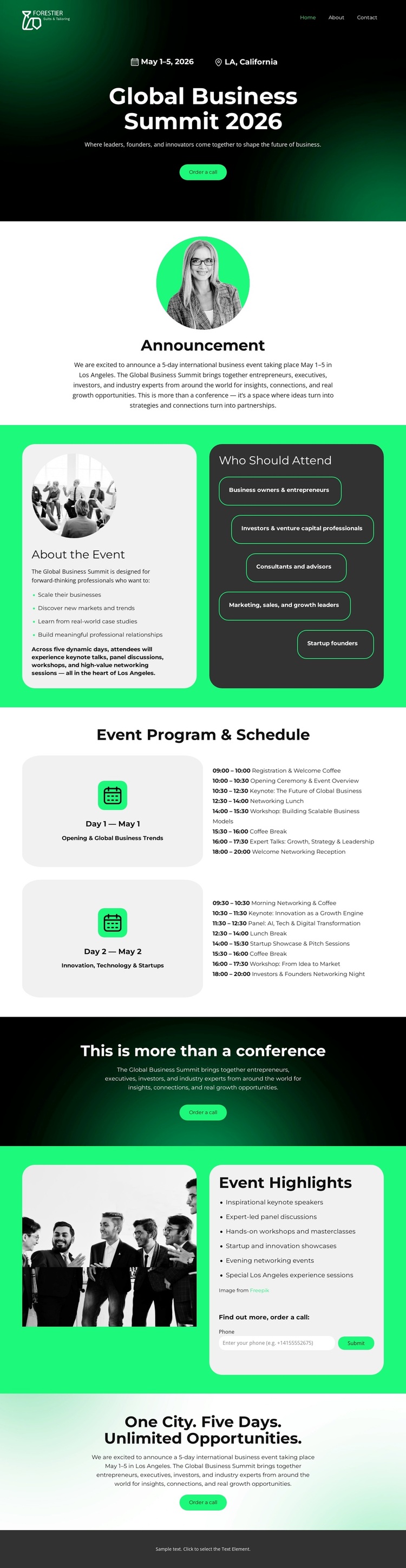
The page’s strongest identifying feature is the way it joins a bold summit invitation with concrete program information. The dark gradient hero introduces Global Business Summit 2026 through its date range, Los Angeles location, and primary action, while the announcement and event overview explain what the gathering represents. The attendee panel then makes the intended audience visible by naming business owners, investors, consultants, growth leaders, and startup founders.
The two schedule cards make the design especially suitable for an event that needs more than a generic conference banner. Separate May 1 and May 2 program areas show how the content can communicate a multi-day experience without overwhelming the opening message. The later highlights section adds black-and-white event photography, a list, and a compact contact request form, balancing visual proof with a practical way to continue the conversation.
This combination makes the template a useful choice for projects that need both atmosphere and event detail. It does not rely only on a decorative hero or a list of services; it gives the visitor an invitation, audience context, program structure, supporting highlights, and repeated opportunities to respond. The neon-green accents and alternating dark, white, and pale green backgrounds reinforce the summit character while keeping the informational sections visually distinct.
Customize with Nicepage
Open this ready-made template in the Template Builder and customize it visually in the Nicepage editor. Replace demo content, edit page sections, and adapt the design to your project without rebuilding the template from scratch.
Start With a Ready-Made Template
Choose a Design for a New Page
Use a ready-made template as a starting point instead of creating every page from a blank canvas. When adding a new page in Nicepage, browse available designs, compare different layouts, and choose an option that already fits the general purpose and visual direction of your project.
Browse Different Page Designs
Explore Page Designs using search, thematic categories, Design Sets, and full-page previews. The collection includes layouts for different subjects and page purposes, making it easier to compare alternatives before selecting a design to customize.
Customize the Selected Template
After choosing a design, create the page and continue editing it visually in Nicepage. Replace the demo content, adjust images, typography, colors, sections, and other elements, and adapt the ready-made layout to your own content instead of rebuilding the design from the beginning.
Explore More Design Directions
If the first option does not match your project closely enough, return to the design collection and compare other templates before committing to a layout. This makes the template library useful not only for faster page creation, but also for exploring different visual approaches and finding a suitable starting point for a new project.
This workflow gives you access to a broad collection of ready-made designs that can be selected, compared, and customized according to the needs of each new page or project.