Branding Agency Template


Edit Template Offline
2. Create new page and search for id 26397
Edit Template Online
Create Awesome Websites


Free Nicepage Builder
Keywords
Brand Philosophy, Photography, and Substance Shape the Choice
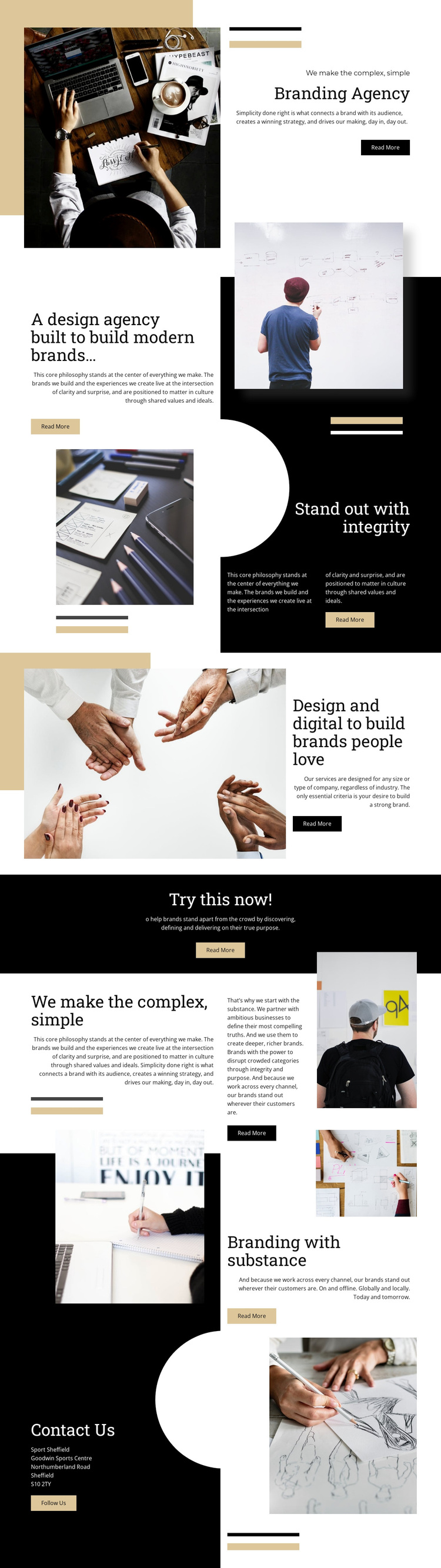
Large editorial photography carries much of the first impression, beginning beside the “Branding Agency” heading and continuing through the sections about modern brands, integrity, and brand substance. That emphasis makes the design a useful choice for projects that need to communicate a point of view visually instead of relying on dense corporate explanation. The photographs are not confined to one gallery; they recur beside philosophy copy, service language, and the closing contact content, so imagery remains connected to the agency story throughout the page.
The content coverage is another reason to choose this option. The page introduces the organization, explains its approach to branding and design and digital work, presents ideas about simplicity and integrity, and returns to a direct contact area. “Read More” actions appear across the sequence, while the centered “Try this now!” band provides a short promotional pause between longer editorial sections. This gives the design both an expressive narrative and recognizable points of interaction without changing its underlying character.
Black, cream, white, and ochre blocks, thin rules, asymmetrical compositions, and a serif display face paired with sans-serif text make the visual direction especially identifiable. The result suits a branding or creative-services project that wants its presentation to feel considered, image-led, and substantive. The displayed Sheffield location and Follow Us prompt also give the closing section a concrete local and social context.
Customize with Nicepage
Open this ready-made template in the Template Builder and customize it visually in the Nicepage editor. Replace demo content, edit page sections, and adapt the design to your project without rebuilding the template from scratch.
Start With a Ready-Made Template
Choose a Design for a New Page
Use a ready-made template as a starting point instead of creating every page from a blank canvas. When adding a new page in Nicepage, browse available designs, compare different layouts, and choose an option that already fits the general purpose and visual direction of your project.
Browse Different Page Designs
Explore Page Designs using search, thematic categories, Design Sets, and full-page previews. The collection includes layouts for different subjects and page purposes, making it easier to compare alternatives before selecting a design to customize.
Customize the Selected Template
After choosing a design, create the page and continue editing it visually in Nicepage. Replace the demo content, adjust images, typography, colors, sections, and other elements, and adapt the ready-made layout to your own content instead of rebuilding the design from the beginning.
Explore More Design Directions
If the first option does not match your project closely enough, return to the design collection and compare other templates before committing to a layout. This makes the template library useful not only for faster page creation, but also for exploring different visual approaches and finding a suitable starting point for a new project.
This workflow gives you access to a broad collection of ready-made designs that can be selected, compared, and customized according to the needs of each new page or project.