HR blog Template


Edit Template Offline
2. Create new page and search for id 6520960
Edit Template Online
Create Awesome Websites


Free Nicepage Builder
Keywords
Six HR Stories Give This Design a Focused Editorial Identity
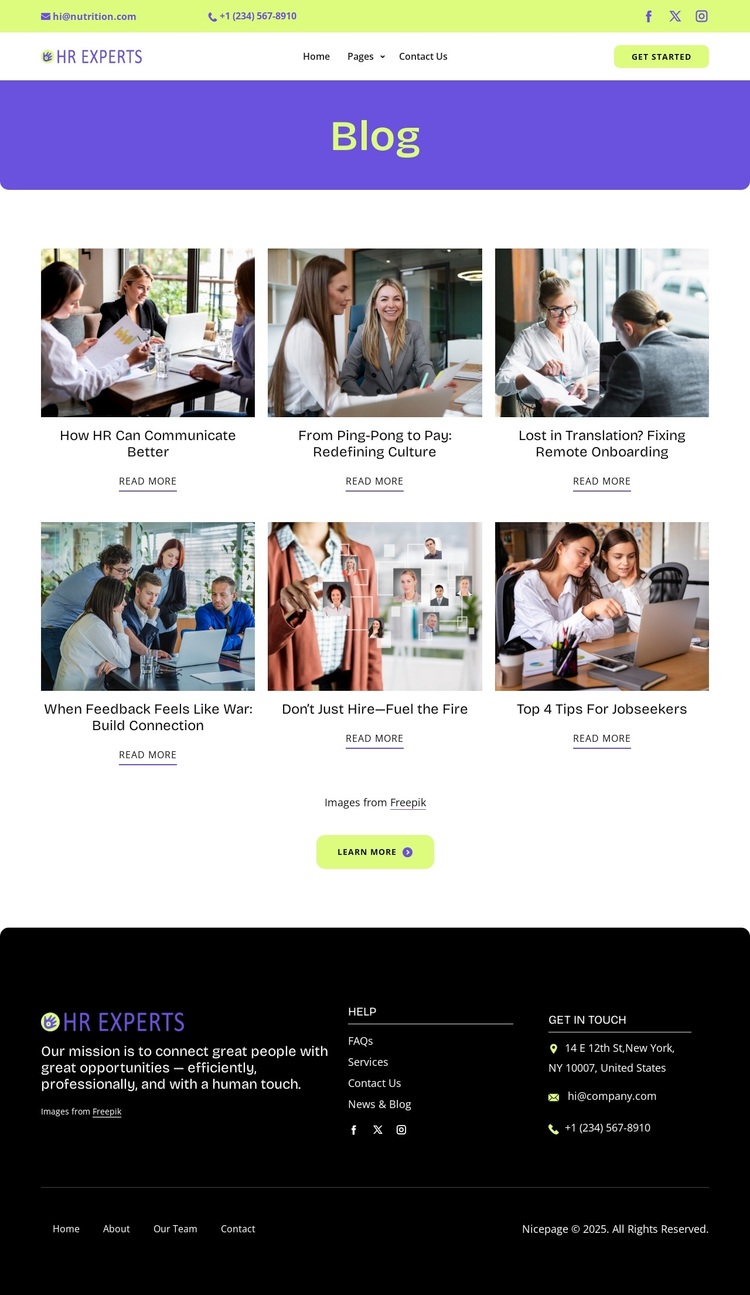
The six article cards are the clearest reason to choose this design. Rather than presenting generic business services or a single promotional message, the page organizes its content around recognizable HR questions: communication, workplace culture, remote onboarding, feedback, hiring, and job seeking. Workplace photography carries the subject visually, while the repeated title-and-reading-link pattern makes the layout suitable for visitors who want to browse several related topics.
The surrounding structure supports that editorial choice without overwhelming it. A two-tier header supplies contact links, social icons, navigation, branding, and a Get Started button, so the page still feels connected to an organization rather than functioning as an isolated list of posts. The purple Blog banner provides a direct visual label, and the white content area keeps attention on the six article choices.
The dark footer broadens the page’s coverage with mission text, Help links, Get In Touch information, address, email, phone, social links, and lower navigation. That combination makes the template a useful option for an HR or recruitment project that needs to combine thought-leadership content with practical contact access. Its distinction is the balance between a specific workplace subject, image-supported article discovery, and a complete organizational frame—not a claim that it already contains a larger site or a verified set of real publications.
Customize with Nicepage
Open this ready-made template in the Template Builder and customize it visually in the Nicepage editor. Replace demo content, edit page sections, and adapt the design to your project without rebuilding the template from scratch.
Start With a Ready-Made Template
Choose a Design for a New Page
Use a ready-made template as a starting point instead of creating every page from a blank canvas. When adding a new page in Nicepage, browse available designs, compare different layouts, and choose an option that already fits the general purpose and visual direction of your project.
Browse Different Page Designs
Explore Page Designs using search, thematic categories, Design Sets, and full-page previews. The collection includes layouts for different subjects and page purposes, making it easier to compare alternatives before selecting a design to customize.
Customize the Selected Template
After choosing a design, create the page and continue editing it visually in Nicepage. Replace the demo content, adjust images, typography, colors, sections, and other elements, and adapt the ready-made layout to your own content instead of rebuilding the design from the beginning.
Explore More Design Directions
If the first option does not match your project closely enough, return to the design collection and compare other templates before committing to a layout. This makes the template library useful not only for faster page creation, but also for exploring different visual approaches and finding a suitable starting point for a new project.
This workflow gives you access to a broad collection of ready-made designs that can be selected, compared, and customized according to the needs of each new page or project.

Design Set (28)
-

-
-
-
-
-
-
-
-
-
Free Website Builder SoftwareDownload
-
-
-
-
-
-
-
-