
Relevance in business Joomla Template
Edit Template Offline
2. Create new page and search for id 90019
Edit Template Online
Create Awesome Websites


Free Nicepage Builder
Keywords
Cases, Team, and Posts Divide the Agency Content Clearly
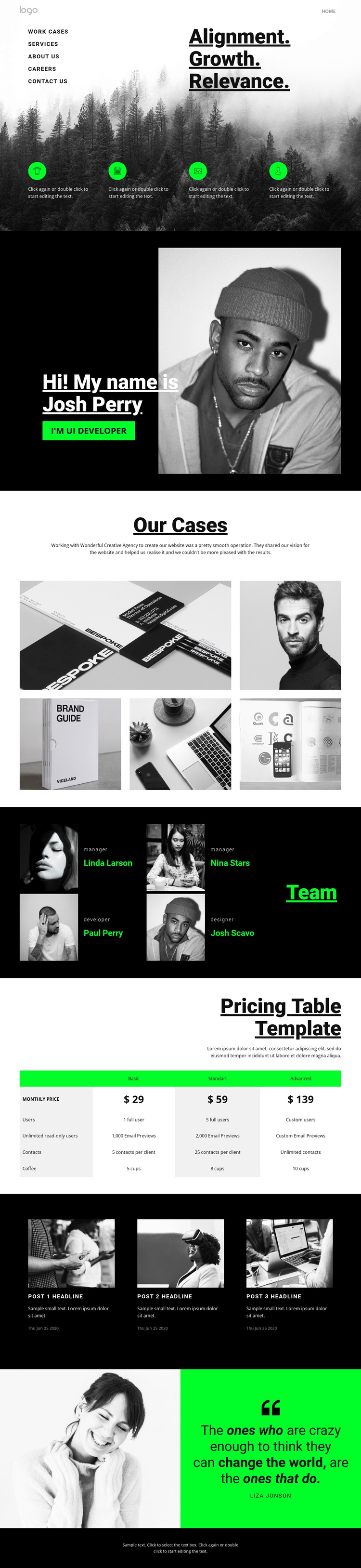
The page separates its agency information into distinct regions that can be understood as structured CMS content rather than as one uninterrupted visual composition. The five-image “Our Cases” area provides a focused space for portfolio work, while the four team profile cards create a repeated people-oriented group with role labels and names. These two sections serve different informational purposes, yet their shared dark presentation keeps them within one recognizable design system.
The pricing table introduces another clearly bounded content type. Its three plan columns—Basic, Standart, and Advanced—organize monthly prices, users, and contacts in a comparison format that can be maintained separately from the portfolio and team material. Farther down the page, three repeated editorial post cards introduce image-led entries with headlines, excerpts, and dates. This gives the design a natural distinction between relatively stable agency information and content that can be updated over time.
Navigation labels, mobile navigation, the shared dark footer, and the closing quotation complete the page’s regional structure. In a Joomla project, those areas provide a practical basis for organizing menus, services, case information, team content, editorial entries, and contact-oriented communication without presenting the sample names, prices, or post text as fixed business facts.
Customize with Nicepage
Open this ready-made template in the Joomla Page Builder and customize it visually in the Nicepage editor. Replace demo content, edit page sections, and adapt the design to your project without rebuilding the template from scratch.
Work With This Template in Joomla
Customize and Install the Joomla Template
Start with this ready-made template instead of building the Joomla design from scratch. Customize its layout, content, typography, images, sections, and other design elements visually in the Nicepage application, then export and install the Joomla Template, Nicepage Extension, and supported content on your Joomla website.
Edit the Template Directly in Joomla
After installation, you can edit the Joomla Template directly in Joomla with the Nicepage Joomla Extension. Customize the Header, Footer, Colors, Fonts, typography, and Page Templates from the Joomla workflow while keeping the site design connected with your CMS content.
Edit Joomla Articles Visually
Use the Nicepage Joomla Extension to open and edit Joomla Articles visually from the Joomla Administrator. Change text, images, sections, layouts, and other page content in the Nicepage editor while continuing to manage the Articles through Joomla.
Joomla Content and Template Integration
Use the customized template together with Joomla Articles, module Positions, menus, forms, Blog Pages, and other supported CMS elements. With the Nicepage Extension used as the Site Style Source, shared design settings can be applied across Joomla Articles while Joomla continues to provide the CMS environment for managing site content.
This workflow combines a ready-made Joomla Template with visual customization, direct template editing in Joomla, and continued content management through the Nicepage Joomla Extension.





















