Luxury Cruise Tours Joomla Template


Edit Template Offline
2. Create new page and search for id 6684068
Edit Template Online
Create Awesome Websites


Free Nicepage Builder
Keywords
Cruise Packages and Services Divide the Design into Manageable Content Regions
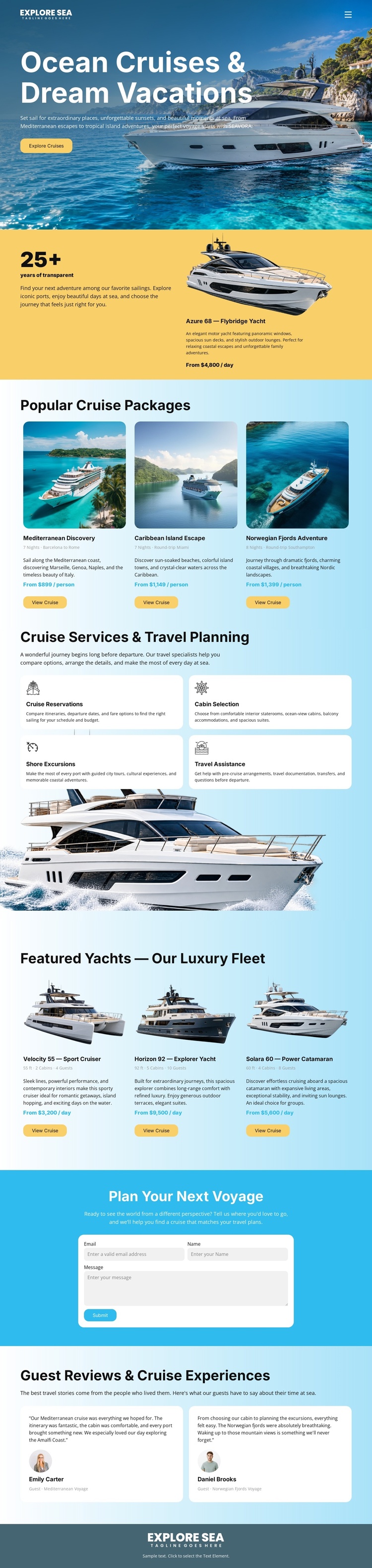
The package cards, travel services, yacht listings, reviews, and contact area divide this design into content regions that can be understood independently while remaining visually coordinated. The three cruise packages provide destination-oriented information, whereas the four service cards describe the assistance surrounding a voyage. The three featured yacht cards add a separate product-like group with images, specifications, descriptions, prices, and View Cruise buttons.
That distinction matters for a CMS-managed travel project because recurring informational areas do not need to be treated as one undifferentiated block. Navigation can lead visitors from the introductory yacht presentation to packages, services, fleet content, and planning information. The guest review section then gives the page a separate experience-focused region rather than mixing quotations into the product cards. The shared Explore Sea footer offers a consistent closing area for site-wide identity.
Joomla can provide the content environment for organizing such structured sections while the design continues to connect them through color, rounded cards, and ocean imagery. If the page is extended, the existing relationships suggest useful editorial boundaries: destination offerings, yacht information, assistance, and voyage inquiries. The template therefore supports a Joomla-oriented site structure through its clearly separated content groups, not merely through a CMS label.
Customize with Nicepage
Open this ready-made template in the Joomla Page Builder and customize it visually in the Nicepage editor. Replace demo content, edit page sections, and adapt the design to your project without rebuilding the template from scratch.
Work With This Template in Joomla
Customize and Install the Joomla Template
Start with this ready-made template instead of building the Joomla design from scratch. Customize its layout, content, typography, images, sections, and other design elements visually in the Nicepage application, then export and install the Joomla Template, Nicepage Extension, and supported content on your Joomla website.
Edit the Template Directly in Joomla
After installation, you can edit the Joomla Template directly in Joomla with the Nicepage Joomla Extension. Customize the Header, Footer, Colors, Fonts, typography, and Page Templates from the Joomla workflow while keeping the site design connected with your CMS content.
Edit Joomla Articles Visually
Use the Nicepage Joomla Extension to open and edit Joomla Articles visually from the Joomla Administrator. Change text, images, sections, layouts, and other page content in the Nicepage editor while continuing to manage the Articles through Joomla.
Joomla Content and Template Integration
Use the customized template together with Joomla Articles, module Positions, menus, forms, Blog Pages, and other supported CMS elements. With the Nicepage Extension used as the Site Style Source, shared design settings can be applied across Joomla Articles while Joomla continues to provide the CMS environment for managing site content.
This workflow combines a ready-made Joomla Template with visual customization, direct template editing in Joomla, and continued content management through the Nicepage Joomla Extension.