Travel Blog Joomla Template


Edit Template Offline
2. Create new page and search for id 21070
Edit Template Online
Create Awesome Websites


Free Nicepage Builder
Keywords
Destination Regions and Navigation Form Structured CMS Content Areas
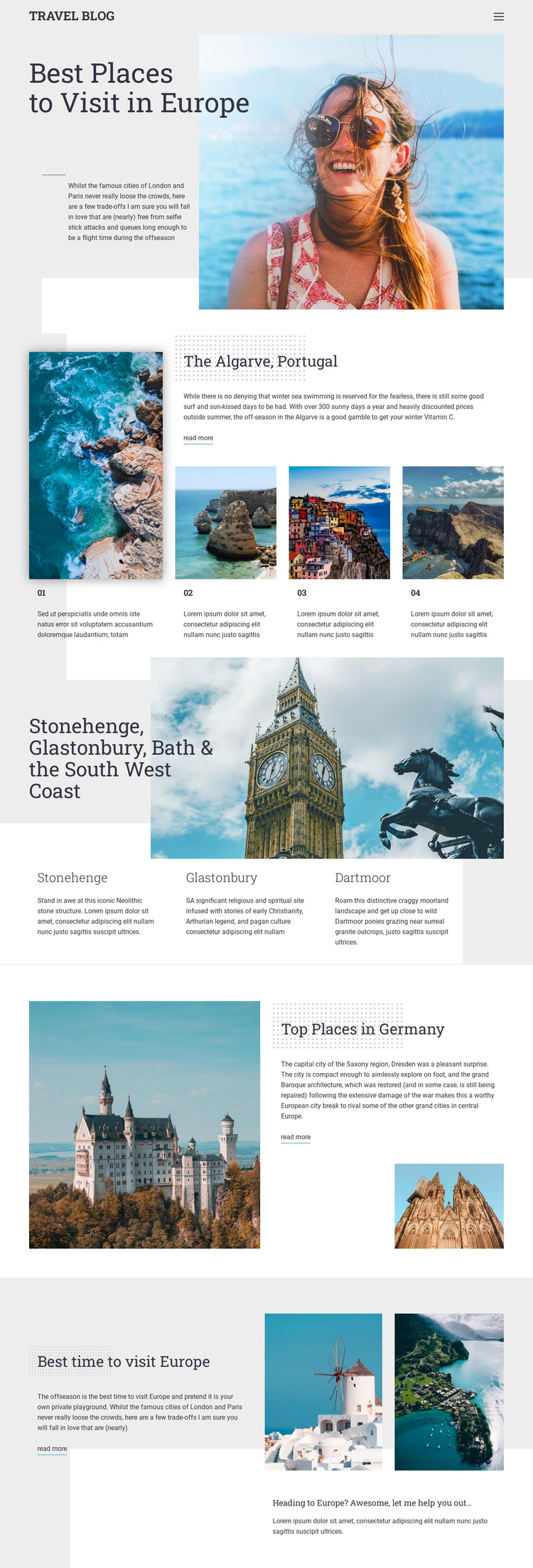
The page divides its travel material into recognizable regions that are suitable for a CMS-managed content arrangement. The header and eight-link navigation create a shared site frame, while the hero establishes the broad European destination topic. From there, the Algarve section gives Portugal a featured story, three numbered supporting items, and a read-more path. That combination separates a lead destination from related entries without losing the common visual treatment.
The South West England block groups Stonehenge, Glastonbury, and Dartmoor beneath a regional image and three aligned descriptions. This is a different content relationship from the Algarve feature: it presents several location highlights at an equivalent level. The Germany section then returns to a more article-like arrangement, pairing a large landscape image with Dresden-related text and supporting imagery. These variations provide meaningful regions for structured travel information, rather than a page made from identical cards.
Seasonal advice closes the page with “Best time to visit Europe,” two photographs, and a short prompt. In a Joomla project, navigation, destination information, repeated highlights, galleries or images, and closing guidance could remain coordinated as CMS-managed site content. The template analysis does not verify Joomla Articles or module positions inside this design, so the value here is the fit between its existing content regions and a structured editorial site environment.
Customize with Nicepage
Open this ready-made template in the Joomla Page Builder and customize it visually in the Nicepage editor. Replace demo content, edit page sections, and adapt the design to your project without rebuilding the template from scratch.
Work With This Template in Joomla
Customize and Install the Joomla Template
Start with this ready-made template instead of building the Joomla design from scratch. Customize its layout, content, typography, images, sections, and other design elements visually in the Nicepage application, then export and install the Joomla Template, Nicepage Extension, and supported content on your Joomla website.
Edit the Template Directly in Joomla
After installation, you can edit the Joomla Template directly in Joomla with the Nicepage Joomla Extension. Customize the Header, Footer, Colors, Fonts, typography, and Page Templates from the Joomla workflow while keeping the site design connected with your CMS content.
Edit Joomla Articles Visually
Use the Nicepage Joomla Extension to open and edit Joomla Articles visually from the Joomla Administrator. Change text, images, sections, layouts, and other page content in the Nicepage editor while continuing to manage the Articles through Joomla.
Joomla Content and Template Integration
Use the customized template together with Joomla Articles, module Positions, menus, forms, Blog Pages, and other supported CMS elements. With the Nicepage Extension used as the Site Style Source, shared design settings can be applied across Joomla Articles while Joomla continues to provide the CMS environment for managing site content.
This workflow combines a ready-made Joomla Template with visual customization, direct template editing in Joomla, and continued content management through the Nicepage Joomla Extension.